How to Cut False Downtime Alerts Without Missing Real Outages
Your phone buzzes at 2 a.m. The alert says checkout is down. You open the dashboard, the error rate is flat, latency is normal, and the last successful payment was thirty seconds a
Your phone buzzes at 2 a.m. The alert says checkout is down. You open the dashboard, the error rate is flat, latency is normal, and the last successful payment was thirty seconds ago. You silence the alert, go back to sleep, and wake up to a Slack thread asking why the team ignored the page. That’s the cost of noise. It’s not a tool problem. It’s a definition problem.
Reducing false downtime alerts isn’t about making monitoring quieter. It’s about making it trustworthy. You want every page to mean a user can’t do something that matters, and you want to know about it before the support queue fills. The rest is background.
Why Are Your 'Downtime' Alerts Crying Wolf?
Alert fatigue shows up as ignored critical alerts, team burnout, and a loss of trust in the monitoring system you paid for. Once people start muting, you’ve lost. The goal isn’t zero alerts. The goal is 100 percent actionable alerts that map to real user impact.
The gap lives between what the system can measure and what actually constitutes down for the business. A ping fails for half a second. A monitoring node loses connectivity to your VPC. A health check hits a staging endpoint by accident. The system reports failure. No customer notices.
I’ve seen teams alert on CPU above 80 percent. That’s a capacity signal, not an outage signal. It fires during batch jobs, during deploys, during normal traffic spikes. People learn to ignore it. Then one day the database is genuinely saturated and nobody moves until the site is slow for everyone.
Use infrastructure metrics for capacity planning. Use user-centric signals for paging. If you can’t explain the alert in one sentence to a product manager without mentioning servers, it’s probably the wrong alert.
What Are the Most Common Triggers for False Alarms?
Transient network blips are the classic. Packet loss between a single monitoring node and your edge, a brief route flap, or an ISP hiccup will make an ICMP check fail for 10 to 30 seconds and recover on its own. If your alert fires on one failure, you’ll page every time.
Localized failures hurt too. One probe in Frankfurt goes down because of a local power issue. Your service is fine in London, New York, and Singapore. A single-location alert treats a regional network problem as a global outage.
Non-critical dependency issues create noise at scale. Your main site loads fine, but the analytics beacon is slow, or a third-party font CDN is timing out. If your synthetic check waits for every resource, you’ll report the site as down when the user experience is intact.
Overly sensitive thresholds cause flapping. An error rate alert set to 0.1 percent will fire on a single failed request in a quiet window. A latency alert with no burn-in will page during a cold start.
Misconfigured health checks are expensive. A check that hits /health but doesn’t validate authentication, database connectivity, or downstream calls will return 200 while the real flow is broken. The opposite happens too: a check that mimics nothing a real user does will fail when a cosmetic endpoint changes.
Step 1: Define What 'Down' Actually Means for Your Users
Start with a Service Level Indicator, SLI, that you can measure from the user’s perspective. Good candidates are request success rate, request latency at the 99th percentile, and availability of a critical user journey like login or checkout. CPU and memory are supporting metrics, not paging metrics.
From the SLI you set a Service Level Objective, SLO. That’s the target you promise yourself. For example, 99.9 percent of login requests in any 5-minute window succeed, and 95 percent of those succeed in under 200 milliseconds. The 0.1 percent you allow is your error budget.
Alerting on error budget burn rate filters out noise naturally. A single failed request doesn’t burn much budget. A sustained increase does. You can alert when you’re on track to exhaust the 5-minute budget in the next 10 minutes. That gives you early warning without paging for blips.
Worked example. Your API handles about 10,000 requests per minute. Your SLO is 99.9 percent success. You can afford about 10 errors per minute. You alert if you see more than 20 errors per minute for 5 consecutive minutes. That catches real degradation while ignoring a brief spike of 3 errors during a deploy.
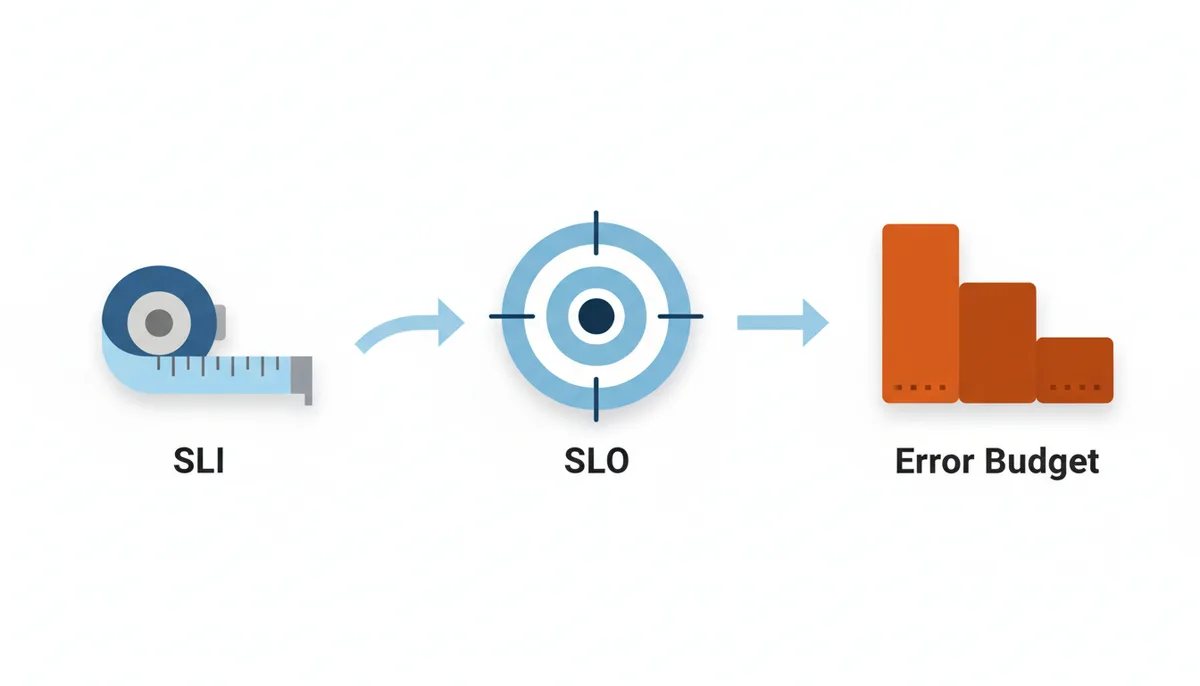
Write the SLO down where everyone can see it, and tie the alert directly to it. If the alert can’t be traced to an SLO, don’t page on it.
Step 2: Confirm Outages with Multi-Location and Multi-Protocol Checks
A single probe lies. Network problems are geographic. A single-location monitor will tell you your site is down when only your monitoring provider’s network is having issues. You need quorum.
Set a consensus rule. With five global locations, require three to fail before you alert. That eliminates single-node failures and most regional ISP issues. If you have fewer locations, require all but one.
Layer your checks by severity. ICMP ping failing is the weakest signal. It can fail because of firewall rules while the service is fine. TCP connect failing is stronger. HTTP GET returning 5xx is stronger still. A full transaction that logs in, fetches data, and writes back is the strongest.
Use the right check for the right question. Ping is fine for basic network reachability. HTTP GET with a specific path and expected status code is the baseline for web services. DNS resolution checks matter if you recently changed providers.
| Check Type | What It Tests | Common False Positive Cause | Best Use Case |
|---|---|---|---|
| ICMP Ping | Network reachability at IP layer | Firewall blocks ICMP, transient packet loss | Quick network path sanity check |
| TCP Port | TCP handshake to a port | Port closed during deploy, transient SYN loss | Confirm service is listening |
| HTTP GET | Full HTTP request and response code | Redirects, bot protection, geo blocks | User-facing endpoint health |
| DNS Lookup | Resolution of a hostname to IP | TTL caching, resolver issues | Validating DNS changes |
| Full Transaction | Simulated user flow with assertions | Test data drift, third-party slowness | Critical business journey monitoring |
When you suspect a local issue, a quick external check helps. IsDownAlarm shows whether a site is down for everyone or just you, with real-time status from multiple vantage points. It’s a sanity check before you declare an incident.
Step 3: Fine-Tune Alert Conditions to Prevent 'Flapping'
Flapping is rapid toggling between OK and ALERT. It happens when a threshold sits on the edge of normal variance. Each toggle creates a page, a Slack message, and a context switch. Teams start to ignore the signal.
Use time-based conditions. Alert only if the error rate is above the threshold for 5 consecutive minutes, or if a check fails 3 times in a row from the same location with a 60 second interval. That lets brief spikes settle.
Use count-based conditions with a minimum sample. If you have low traffic, a single failure is statistically meaningless. Require at least 100 requests in the window before you evaluate the rate.
Worked example. Before tuning, an alert fired on any single 5xx from a synthetic check every minute. The check hit Cloudflare’s challenge page during a brief WAF rule change and fired for 12 minutes. After tuning, you require 3 failures in a row from 2 different locations within 5 minutes. The same event now produces zero pages.
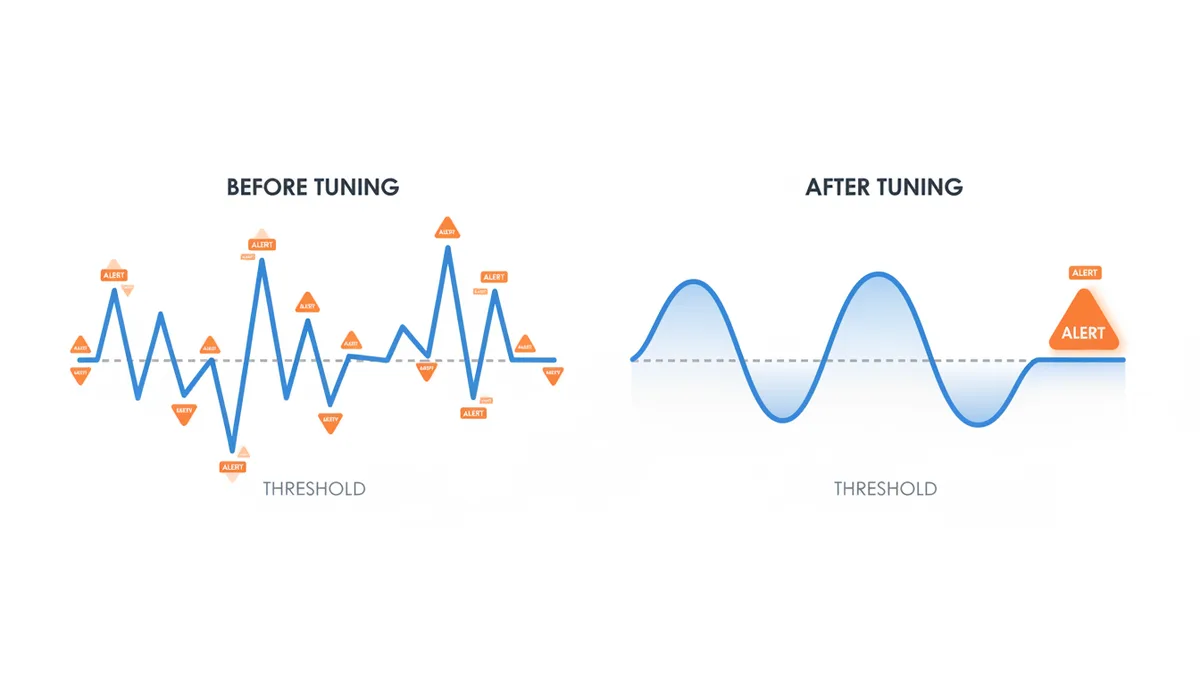
Add a cool-down. Once an alert fires, suppress further notifications for 15 minutes unless the condition worsens. You still get updates in the dashboard, but you don’t spam the on-call engineer.
Step 4: Suppress Downstream Noise with Dependency Mapping
If the primary database is down, you don’t need 50 alerts from every service that depends on it. That’s alert correlation and dependency awareness.
Build a simple dependency tree. Web App depends on API, API depends on Database and Shared Cache, Billing Service depends on API and Payment Gateway. Document it in your runbook.
Configure alert suppression. When the root component is in an alert state, silence dependent alerts and send one high-context alert that names the root. When the root recovers, re-enable dependents and verify.
This requires naming. Use consistent service names across Prometheus, Grafana, Datadog, New Relic, AWS CloudWatch, and Google Cloud Monitoring. Tag alerts with the owning team and the dependency chain.
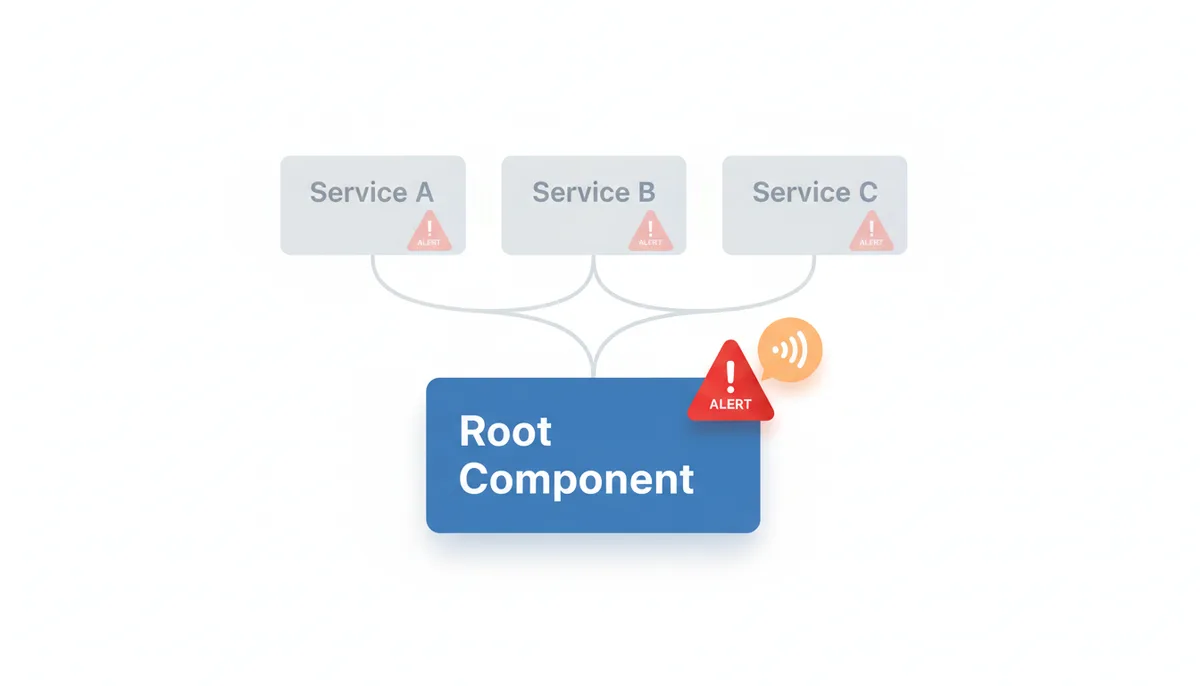
Root Cause Analysis gets faster too. You stop chasing symptoms and start at the source.
How to Choose Between Synthetic and Real User Monitoring (RUM)
Synthetic monitoring is proactive. You simulate user requests from controlled locations on a schedule. It detects outages before users do and works even at 3 a.m. on a quiet site. The risk is false positives if the script doesn’t match real behavior, hits a test endpoint, or is blocked by bot protection.
Real User Monitoring is passive. You collect data from actual browsers and apps. It’s the ground truth for user impact: real latency, real errors, real devices. It can’t detect an outage if there’s no traffic, and it’s noisy during real user anomalies.
Use both. Synthetic for early detection and coverage of critical paths. RUM for validation and for measuring SLOs that matter.
| Attribute | Synthetic Monitoring | Real User Monitoring |
|---|---|---|
| Detection Type | Proactive | Reactive |
| What It Measures | Simulated requests from fixed locations | Actual user requests from real devices |
| Best For | Outage detection, SLA verification | SLO measurement, performance analysis |
| False Positive Risk | Higher if script drifts from real flow | Lower for user impact, higher for low traffic |
| Coverage | Controlled, predictable | Dependent on user volume and geography |
If you have to choose one for paging, start with synthetic on the critical journey with multi-location quorum, then confirm with RUM data before escalating.
Managing Alerts During Planned Maintenance and Deployments
Planned work should never page people. Create maintenance windows in your monitoring tool and silence alerts for the affected services during the window. Document the window, the owner, and the rollback plan. If you forget, you’ll train the team to ignore pages.
For deployments, use a maintenance mode or automatically silence alerts for services in the CI/CD pipeline. Bring the alert back after health checks pass. If you’re doing canary or blue-green, set more sensitive thresholds for the new version while it receives a small percentage of traffic. Once it proves stable, promote and relax.
Never disable alerting entirely for a deploy. Keep a single canary alert that fires if error rate spikes above your SLO. That’s the safety net.
Building a Culture of Continuous Alert Improvement
Alert tuning isn’t a one-time fix. Run a regular alert review. Pull the last month of pages, count how many led to action, and how many were ignored or auto-resolved. Kill the ones with no action.
Post-incident reviews should always ask three questions: Did our alerting work as expected? Was it too noisy, too slow, or just right? What change will prevent this class of noise next time?
Give service owners ownership of their alerts. They should define the SLO, the thresholds, the runbook, and the escalation. Central SRE can provide guardrails and tooling, but the team that owns the service owns the signal.
Document every alert with a clear response plan. If someone can’t say what to do in two minutes, the alert isn’t actionable. Delete it or fix it.
How Health Checks Lie: The Mechanism Behind False 200s
A health endpoint that returns 200 OK tells you almost nothing useful. Most teams start with a shallow check: is the process listening on port 8080? That’s a TCP check, not a health check. It will stay green while the database connection pool is exhausted, the message queue is full, or the authentication service is timing out.
The deeper failure mode is semantic mismatch. Your synthetic monitor hits GET /health and gets 200 in 40ms. A real user hits GET /checkout with a session cookie, which triggers a DB read, a cache lookup, a fraud scoring call, and a payment token validation. The health check is fine. The user flow is broken.
This is why you need layered assertions. A proper application health check should validate the critical dependencies that define a successful request, but it should not perform the full request every time you poll. A common pattern is a read-only query against the primary database, a ping to the cache, and a lightweight call to the auth service, with a timeout budget that matches your SLO. If any of those fail, return 503 with a clear reason in the body.
Synthetic checks have the same trap. A GET / that returns 200 because the CDN is serving a cached homepage tells you the edge is up, not that the origin can serve dynamic content. You want a transaction that logs in with test credentials, fetches a protected resource, and asserts on response time and a specific JSON field. That’s more brittle, so you guard it with quorum and longer evaluation windows.
There is also the false negative side. A health check that is too strict will flap during normal deploys. If you require a 100 percent success rate on a dependency that has its own brief blips, you’ll page for problems that self-heal. The fix is to distinguish liveness from readiness. Liveness is for the orchestrator: is the process alive? Readiness is for traffic: can it serve real requests right now? Alert on readiness failures, not liveness restarts.
In practice, I run a shallow TCP check every 30 seconds for fast detection, and a deep transaction every 2 minutes for correctness. The shallow check can warn, the deep check must confirm before paging. That separation cuts noise without adding latency to real incident detection.
Worked Example: Tuning a High-Traffic API From 40 Pages a Week to Two
A payments API team I worked with was getting 40 pages a week. Most were at night, most were resolved by the time someone looked. The alert was error rate > 1 percent for 1 minute from a single synthetic location.
We started by pulling a month of alerts and tagging each one. 28 were single-location blips that recovered in under 90 seconds. 7 were caused by a third-party KYC service that was slow but still returning 200. 3 were real incidents. Two were missed because the threshold was too high.
First change: define down. The SLO was 99.95 percent success for POST /payments in a 10-minute window, with p95 latency under 800ms. That translates to about 3 failures per 6,000 requests. We switched from a static 1 percent threshold to error budget burn rate. With about 600 requests per minute, the SLO allows roughly 0.3 errors per minute on average. We alert if we see 2 or more failures in a 2-minute window, which projects to exhausting the 10-minute budget of ~3 failures.
Second change: confirm with quorum. The synthetic check ran from five locations every 60 seconds. We required three locations to fail the deep transaction in a 5-minute window before paging. That removed the single-node network hiccups.
Third change: fix the health check. The synthetic script was hitting GET / and expecting 200. We replaced it with a login plus a small payment creation flow with assertions on status code, response time, and a known field in the JSON. We also added a 10-second timeout to avoid hanging on slow third-party calls.
Fourth change: dependency awareness. When the KYC service degraded, the API started returning 429s for rate limiting, not 500s. We added a separate, lower-priority alert for KYC latency and suppressed the main API alert when KYC was the root cause.
After four weeks, pages dropped to two per week, both real. Mean time to acknowledge fell because engineers trusted the page. The trade-off was a 90-second delay in detection for the rare cases where an outage starts in one region and spreads. That’s acceptable for this service.
Edge Cases That Break Even Well-Tuned Alerting
Partial degradation is the hardest to catch. Error rate stays flat, latency creeps up 15 percent, and a small cohort of users on a specific mobile carrier sees timeouts. Your SLO might still be met in aggregate while real users suffer. You need percentile-based alerts and segmentation by region, device class, and network.
Brownouts are another one. The service returns 200 but with empty data because a cache is cold and the DB is throttling. Synthetic checks that only assert status code will miss it. Add content assertions: check for a non-empty array, a specific header, or a minimum response size.
Rate limiting creates noisy 429s that look like outages. If your synthetic checks run on a fixed schedule from the same IP, you can hit your own rate limits. Rotate IPs, add jitter, and treat 429s differently from 5xxs. Alert on sustained 429s for real user traffic, not for the monitor.
DNS propagation and CDN cache behavior cause flapping after a deploy. You push a new version, the CDN still serves old assets from some PoPs, and mixed content triggers errors for a subset of users. A multi-location check with a short evaluation window will see intermittent failures. Use a longer window after deploys or compare error rates across versions.
Low-traffic services have no signal. RUM is useless if you get 10 requests an hour. Synthetic checks become the only source of truth, but they can create false positives during scheduled maintenance windows of dependencies. For these services, alert on availability of the synthetic check itself, not on error rate, and keep the threshold at 2 consecutive failures.
The fix for all of these is context. Tag every alert with service, version, region, and dependency. When something odd happens, you can slice the data instead of guessing.
The Real Cost of Alert Noise: On-Call Burnout and Missed Revenue
People talk about tooling cost, but the bigger cost is engineer time and trust. As an example, if a noisy alert costs about 20 minutes of context switching even if it’s a false positive, multiply that by 40 pages a week across a five-person rotation and you’re burning 40 hours a week on noise under those assumptions. That’s a full headcount spent on nothing.
Tuning takes work up front. As an example, you might budget one engineer for two weeks to audit alerts, define SLOs, and rewrite synthetic checks for a medium-sized service. That’s a real investment. The return shows up as fewer pages, faster incident response, and fewer post-mortems about missed alerts.
There is also a revenue angle. As an illustrative calculation, if your team starts ignoring pages, a real outage can last 20 minutes longer before anyone acts. For a checkout flow doing $50k per hour, that’s a $16k mistake from one missed incident under those assumptions. A single real miss pays for a lot of tuning time.
Tooling choices matter for cost. Multi-location synthetics and full transaction monitors cost more than basic ping checks. You don’t need premium coverage for every endpoint. Prioritize by business impact. Critical user journeys get five locations and deep checks. Internal tools get one location and a simple HTTP check.
The effort never ends. As an example, some teams budget 10 percent of sprint capacity for alert hygiene: review the last month of pages, delete dead alerts, and update runbooks. If you treat alert tuning as a one-time project, noise will creep back in within a quarter.
FAQ
What is a good signal-to-noise ratio for alerts?
There’s no universal number, but a healthy team should aim for over 95 percent of alerts being actionable and leading to a specific investigation or intervention. The ultimate goal is for every alert to be treated as a real, urgent event.
How do I handle alerts for third-party services my application depends on?
Monitor third-party dependencies, but alert on them differently. A failure in a critical dependency like a payment gateway should trigger a high-priority internal alert. A non-critical one like a social media login API might create a lower-priority ticket for follow-up.
Can I automate alert tuning?
Yes, to an extent. Some AIOps and observability platforms use machine learning to detect anomalies and suggest better thresholds. A human still needs to define what is normal and what constitutes a user-impacting problem.
Is it ever okay to just delete a noisy alert?
Yes. If an alert has repeatedly proven to be non-actionable and provides no valuable information, it’s better to delete it than to let it contribute to alert fatigue. Every alert should have a purpose and a documented response plan.
What's the difference between an SLO and an SLA in alerting?
An SLO is an internal target for performance and reliability that you alert on, such as 99.9 percent uptime. An SLA is a contractual promise to a customer, often with financial penalties. You should alert on your SLO before you are in danger of violating your SLA.
Should my staging/development environments have the same alerting rules as production?
No. Pre-production environments should have much less sensitive alerting, if any. Alerts should be focused on blocking a bad deployment, not on paging an on-call engineer for a non-production system failure.
Sources
- Google SRE — The concepts of Service Level Objectives (SLOs), error budgets, and the principles of actionable alerting.
- Prometheus Documentation — Best practices for defining alerting rules, including using the 'FOR' clause to prevent flapping and grouping alerts.
- AWS Well-Architected Framework — The principles of monitoring distributed systems and establishing metrics for the Reliability pillar, which underpins effective alerting.
- IETF RFC 9110 (HTTP Semantics) — The official definitions of HTTP status codes (e.g., 5xx server errors), which are a fundamental SLI for web services.