How to Choose Between Email, SMS, and Telegram Downtime Alerts
You’re staring at a critical error message. Your e-commerce site is throwing 500s. Your API is returning timeouts. The clock is ticking, and every second of downtime translates dir
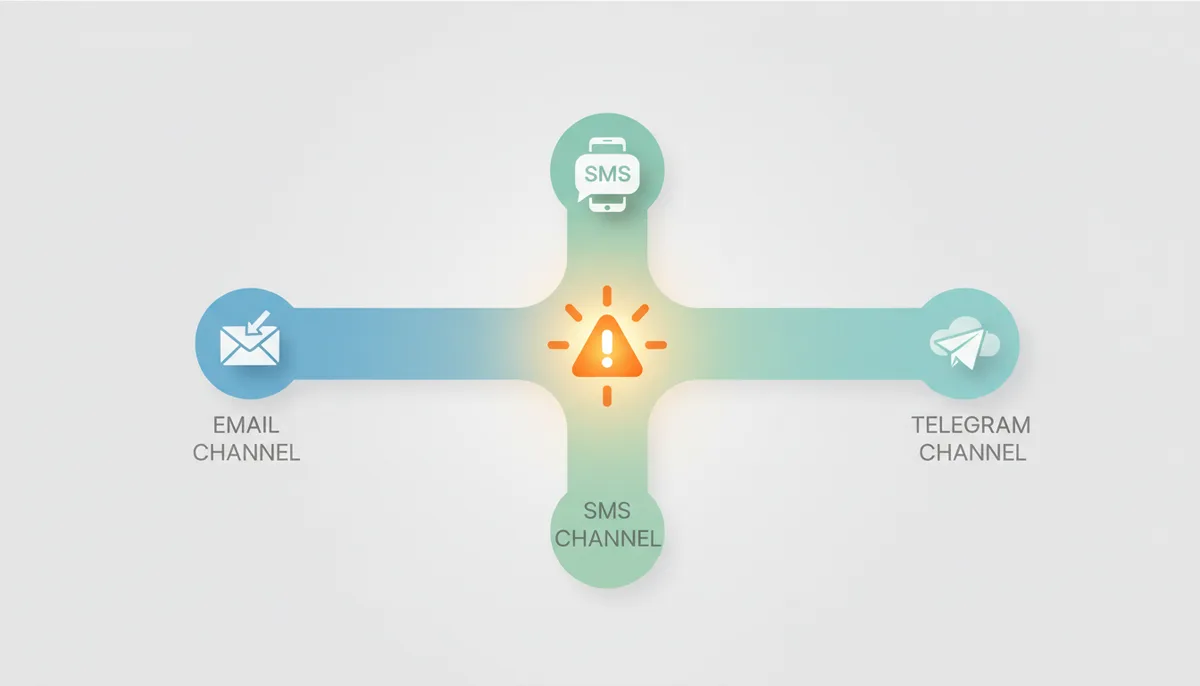
You’re staring at a critical error message. Your e-commerce site is throwing 500s. Your API is returning timeouts. The clock is ticking, and every second of downtime translates directly into lost revenue or frustrated customers. What’s the *first* thing that needs to happen? You need the right person to know, immediately. But how do you get that notification, and which channel – email, SMS, or Telegram – is the best way to do it? Getting this wrong isn’t just an annoyance; it dictates how quickly you can resolve incidents and impacts your Mean Time to Resolution (MTTR).
The choice of alerting channel isn’t just about technical capability. It’s about people, process, and prioritizing what’s truly urgent. We’ll move beyond a simple feature comparison and build a decision framework based on real-world scenarios, team structures, and technical constraints. It's about building a resilient and context-aware alerting strategy.
Why Your Choice of Alert Channel Defines Your Response Time
Alerting isn’t simply about transmitting a message. It’s the first, critical step in your incident response workflow. The goal is to trigger the *right* action by the *right* person as quickly as possible. Your alerting channel determines whether that happens seamlessly or falls apart. Think of it like this: a perfectly sensitive monitoring system is useless if the alert gets buried in an inbox or ignored because of ‘alert fatigue.’
There are core trade-offs at play. Reach vs. Richness: Do you need to get to everyone, or just a focused group? Immediacy vs. Detail: Do you need immediate action, or can the recipient handle a longer explanation? Reliability vs. Cost: How critical is it that the alert *always* gets through, and what are you willing to pay for that guarantee? These trade-offs directly influence both your Mean Time to Acknowledge (MTTA)—how long it takes someone to even *see* the alert—and, ultimately, your MTTR. If an engineer doesn’t get the page until an hour later because the alert got stuck in a queue, you can assume your MTTR will be substantially impacted.
How Each Alerting Channel Actually Works
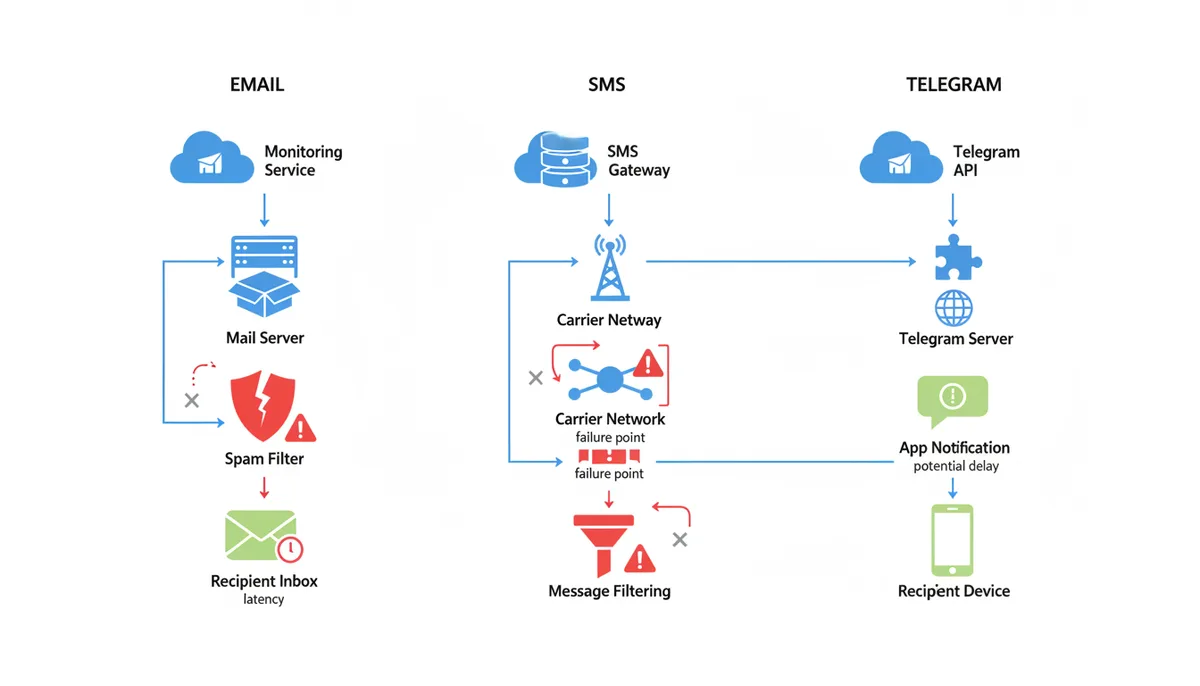
Let’s break down how each channel functions behind the scenes. Email seems simple, but it's a surprisingly complex system. When an alert triggers, your monitoring service sends a message via SMTP (Simple Mail Transfer Protocol) to a mail server. That server attempts to deliver the email to the recipient’s mail server. From there, it's stored until the recipient syncs their inbox. The inherent delays—server queues, spam filtering, and client-side retrieval—introduce latency. A critical alert might sit unread for minutes, or even hours.
SMS alerts take a different path. They travel through carrier networks and SMS gateways. These gateways translate the alert into a message that can be delivered to a mobile phone. Potential failure points include carrier outages, message filtering (spam controls are increasingly applied to SMS), and limitations in message length. A regional carrier experiencing an issue could block *all* SMS alerts, leaving you blind.
Telegram relies on an internet connection and the Telegram app. Your monitoring service leverages the Telegram Bot API to send messages to a user or a group/channel. Success depends on the user having a stable data connection and notifications enabled. The Telegram servers themselves are highly reliable, but a user with a poor connection or disabled notifications effectively won’t receive the alert. Also, Telegram is subject to the same network partitions as any other internet-based service.
Each channel has unique failure modes. Email server outages, carrier disruptions, and network partitions—they all contribute to potential blindspots. Understanding these vulnerabilities is essential for designing a resilient strategy.
Email Alerts: Best for Detail and Post-Incident Analysis
Treat email as the workhorse for high-context, lower-urgency notifications. It excels at delivering detailed reports, logs, graphs, or diagnostic information. It’s also ideal for sending post-incident summaries to a wider audience—stakeholders who need to be informed but aren’t directly involved in resolving the issue. For example, sending a weekly report summarizing uptime, error rates, and potential vulnerabilities via email is a good use case.
However, email is a poor choice for critical, immediate alerts. ‘Inbox fatigue’ is a real problem. If your team receives dozens of emails a day, a critical alert can easily get buried. Consider a scenario where a database server experiences high CPU load. An email alert might detail the CPU utilization, query times, and affected processes—valuable information, certainly—but a delay in receiving that alert could allow the issue to escalate into a full-blown outage.
SMS Alerts: Unmatched for Immediacy and Reaching Anyone, Anywhere
For sheer urgency, SMS remains king. It bypasses the need for an internet connection (on the recipient’s end) and cuts through digital noise. Think of it as the ‘break glass’ option.
Use SMS for service-down alerts directed to the primary on-call engineer, for final escalation steps when other channels fail, or for infrastructure failures that could take down other communication systems. Imagine a complete network outage impacting your entire cloud infrastructure. Email and Telegram alerts might be useless if the network is down. But, if the on-call engineer’s phone still has cellular connectivity, an SMS alert can grab their attention immediately.
However, SMS isn't a free pass. Costs can escalate quickly, especially with frequent alerts. Character limits prevent detailed context. And carrier filtering can block messages. Use it judiciously, reserved for genuine emergencies, to maintain its impact. Sending an SMS every time a server’s disk space exceeds 70% will quickly diminish its effectiveness.
Telegram Alerts: The Flexible Middle Ground for Teams
Telegram strikes a balance between immediacy and richness. It delivers push notifications, ensuring rapid awareness, while also allowing for team-based communication and interactive elements.
Create a dedicated ‘SRE-Alerts’ or ‘DevOps-OnCall’ channel. Use bots to add interactive buttons: ‘Acknowledge,’ ‘Escalate,’ ‘Run Diagnostic.’ Provide more context than SMS without the formality of email. For instance, if a web server experiences a 502 error, a Telegram bot can send an alert with the error code, timestamp, affected URL, and links to relevant logs. An engineer can then acknowledge the alert directly within Telegram, stopping further escalation.
Telegram’s main dependency is the internet connection. The service is only as reliable as the user’s data connection and notification settings. A user on airplane mode or with a weak signal won't receive the alert.
| Attribute | SMS | Telegram | |
|---|---|---|---|
| Delivery Mechanism | SMTP Servers, Mail Clients | Carrier Networks, SMS Gateways | Internet Connection, Telegram App/Bot API |
| Immediacy | Low – Minutes to Hours | High – Seconds | Medium – Seconds to Minutes |
| Context/Richness | High – HTML, Attachments | Low – Plain Text, Limited Length | Medium – Formatted Text, Images, Buttons |
| Reliability/Failure Modes | Email Server Outages, Spam Filters | Carrier Outages, Message Filtering | Internet Outages, App Issues, Notification Settings |
| Cost Model | Typically Included in Hosting | Per-Message Cost | Free (Bot API Usage Limits) |
| Ideal Use Case | Detailed Reports, Status Updates, Non-Critical Alerts | Critical Outages, Final Escalation Step | Team Collaboration, Interactive Alerts, Medium-Priority Issues |
How to Map Alert Channels to Incident Severity Levels
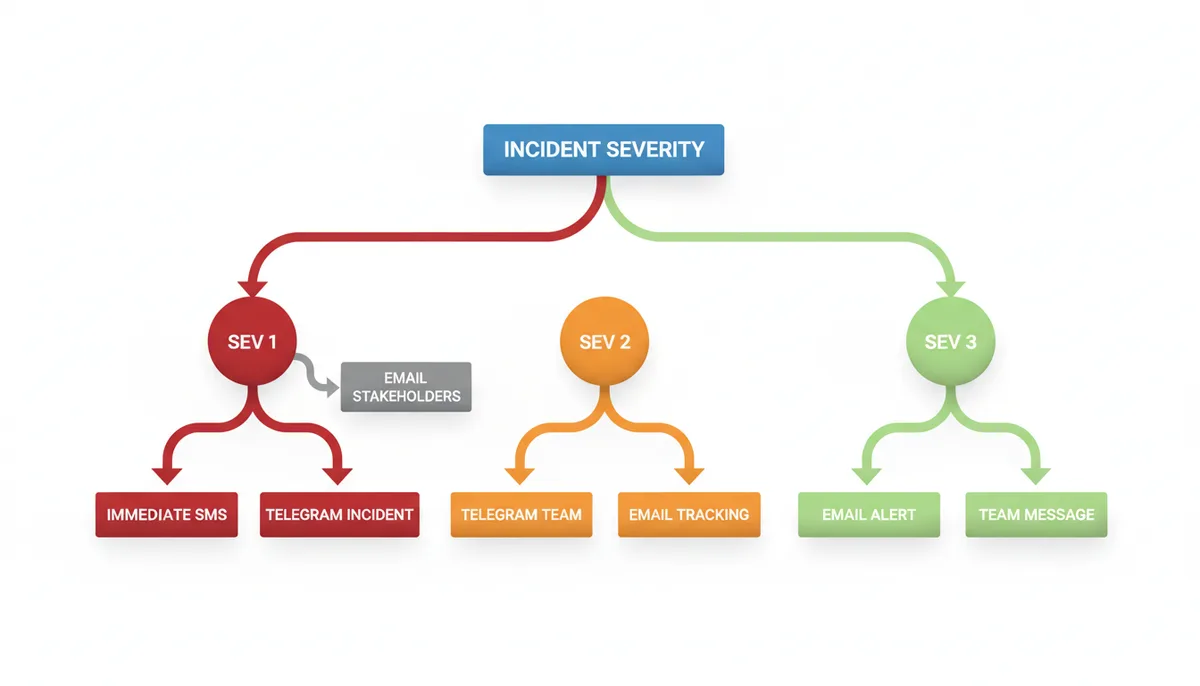
Don’t treat all alerts the same. Map channels to incident severity. This is where you start turning a generalized strategy into something that protects your business.
Here’s a practical example:
- Sev 1 (Critical Outage): Immediate SMS to the primary on-call engineer. Simultaneously, a message to a dedicated Telegram incident response channel. Follow up with an email to key stakeholders *after* the incident is acknowledged.
- Sev 2 (Major Impairment): Immediate Telegram notification to the responsible team's channel. Email alert for long-term tracking.
- Sev 3 (Minor Issue/Warning): Email alert or a message in a lower-priority team channel.
Building a Multi-Channel Escalation Policy That Works
Never rely on a single channel. A robust policy uses a timed sequence. A single point of failure in your alerting system can mean the difference between a minor blip and a full production outage.
Consider this escalation policy:
- Initial alert via Telegram to the on-call engineer.
- If no acknowledgement in 5 minutes, send an SMS.
- If no acknowledgement in 10 minutes, trigger a voice call (via a service like PagerDuty) and alert the secondary on-call engineer via Telegram.
‘Acknowledgement’ is the key. The escalation chain must halt when someone takes ownership. Tools like PagerDuty, Opsgenie, or a custom Telegram bot with an ‘ACK’ button are essential for this. Without acknowledgement, the alerts will continue to escalate, potentially waking up the entire team unnecessarily.
| Time | Primary On-Call Action | Secondary On-Call Action | Team Channel Action | Stakeholder Action |
|---|---|---|---|---|
| T+0 | Telegram Notification | None | Telegram Notification | None |
| T+5m | SMS Notification | Telegram Notification | None | None |
| T+15m | Voice Call | Telegram & SMS Notification | Escalation Alert in Channel | Email Notification |
What Goes Wrong: Common Alerting Strategy Failures
Even the best strategy can fail if you don't anticipate common pitfalls. Alert Fatigue is a huge problem. Over-using high-priority channels for non-critical issues desensitizes your team. Strict adherence to severity levels is the antidote.
Configuration Drift is another killer. On-call schedules change, people leave the company, vacation plans are made… and your alerting rules get stale. Regular audits—at least quarterly—are essential.
And avoid the Single Point of Failure Trap. Don't rely solely on one email provider or SMS gateway. Redundancy is vital. If your primary SMS provider experiences an outage, having a backup ensures you aren’t left in the dark.
Integrating Downtime Alerts with Existing Incident Management Tools
Your monitoring system – perhaps IsDownAlarm – isn’t an island. It needs to feed into your existing incident management workflow. Most teams rely on tools like PagerDuty, Opsgenie, or even ticketing systems like Jira to track and resolve incidents. Directly integrating your downtime alerts with these tools greatly enhances efficiency and provides a single source of truth for all incidents. The goal is to avoid the manual transfer of information—copying alert details into multiple systems—which is slow, error-prone, and frustrating.
The most common integration method is via webhooks. When an alert is triggered, your monitoring system sends an HTTP POST request to a unique URL configured in your incident management tool. This request contains a JSON payload with all the relevant alert data: timestamp, severity, affected service, error message, and any other contextual information. The incident management tool then parses this payload and automatically creates an incident. For example, let’s say you're using PagerDuty. You’d configure a webhook integration within PagerDuty and provide it with the URL that IsDownAlarm uses to send alert notifications. When IsDownAlarm detects a downtime event for your production database, it posts data to that PagerDuty webhook. PagerDuty then creates a new incident, assigns it to the appropriate on-call engineer based on your escalation policy, and initiates the notification process (SMS, phone call, etc.).
However, it’s not always seamless. API rate limiting is a common issue. Incident management tools often have limits on the number of API requests they’ll accept within a specific timeframe. If your monitoring system generates a large volume of alerts in a short period (think a DDoS attack triggering hundreds of alerts), you can hit these limits, resulting in missed incidents. To mitigate this, consider implementing alert grouping and deduplication within your monitoring system before sending alerts to your incident management tool. For instance, if multiple checks report the same service as down, consolidate them into a single incident. Also, ensure your webhook payload is concise and only includes essential information to minimize the size of the request.
Another potential problem is data mapping. The data structure in your monitoring system might not perfectly match the expected format of your incident management tool. You may need to use a transformation layer (often available in advanced monitoring platforms) to map fields correctly. For example, IsDownAlarm may call a service 'web-server-01', while PagerDuty expects it to be 'Production Web Server 1'. Without proper mapping, the incident details may be incomplete or inaccurate.
The Role of Synthetic Monitoring and Proactive Alerting
We’ve talked about reacting to downtime, but what about *preventing* it? Synthetic monitoring adds another layer to your alerting strategy. Instead of waiting for users to experience issues, synthetic monitoring proactively simulates user interactions with your application. This means sending requests to your website or API endpoints at regular intervals and validating that they return the expected responses. This allows you to detect problems—like slow page load times or broken API calls—*before* they impact real users. Think of it as a canary in a coal mine.
For example, you could configure a synthetic check to simulate a user logging into your e-commerce site and adding an item to their cart. If the check fails—due to database issues, application errors, or network connectivity problems—you receive an alert. The power here is in catching degradation before it turns into an outage. Imagine you start seeing a consistent slowdown in your login process, detected by synthetic monitoring. You can investigate and resolve the underlying issue before customers begin complaining—preventing significant revenue loss and brand damage.
Integrating synthetic monitoring with your alerting channels creates powerful proactive system. Configure critical synthetic checks to trigger SMS alerts for immediate attention, while less urgent checks can send alerts via Telegram or email. The key is to correlate synthetic monitoring data with real user monitoring (RUM) data for a holistic view of your application’s health. If synthetic monitoring shows a slowdown, but RUM data doesn't indicate a widespread issue, it might be a localized problem affecting a specific region or user segment.
The effort required to implement synthetic monitoring varies. Simple checks (e.g., verifying HTTP status codes) are easy to set up. More complex checks—replicating multi-step user workflows—require more configuration and scripting. Most monitoring services offer pre-built synthetic checks for common web applications, streamlining the process. However, custom checks offer the most flexibility and allow you to simulate the specific user flows that are most critical to your business.
Dealing With False Positives and Alert Fatigue
Too many alerts, and your team will start ignoring them. This is known as alert fatigue, and it’s a serious problem. False positives—alerts triggered by transient errors that resolve themselves—are a major contributor. A spike in latency caused by a temporary network blip shouldn't require a midnight page. The goal is to refine your alerting thresholds and logic to minimize false positives while ensuring you don’t miss genuine issues.
One effective technique is dynamic thresholding. Instead of using static thresholds (e.g., "alert if CPU usage exceeds 80%"), dynamic thresholding adjusts the thresholds based on historical data and seasonal patterns. For example, CPU usage might naturally be higher during peak hours. Dynamic thresholding learns these patterns and sets thresholds that are more sensitive during quiet periods and less sensitive during peak periods. This reduces the likelihood of false positives during normal fluctuations.
Another important strategy is alert correlation. Instead of alerting on every individual error, group related errors together and alert only when a certain threshold is reached. For example, if you have multiple servers, don’t alert every time a single server experiences a minor issue. Alert only if a certain percentage of servers are affected. If your monitoring tool supports quorum or multi-location confirmation, a rule like “alert only when 3 of 5 checks fail within 2 minutes” can dramatically reduce alert noise. This reduces alert volume and helps you focus on the most critical problems.
Don’t forget the human element. Regularly review your alert rules with your on-call team. Ask them which alerts are genuinely useful and which ones are just noise. Solicit their feedback and make adjustments accordingly. Also, establish a clear process for acknowledging alerts and documenting resolution steps. A well-defined runbook can help engineers quickly diagnose and resolve common issues, reducing MTTR and preventing repeat incidents.
Cost Considerations: Balancing Alerting Reliability with Budget
Alerting isn’t free. While email alerting is generally inexpensive, SMS and certain Telegram bot features come with costs. The price of SMS varies significantly based on the provider, destination country, and message volume. A simple alert might cost a few cents, but these costs can add up quickly if you’re sending hundreds or thousands of alerts per month. Telegram Bot API use is generally free, though teams may still incur costs for hosting bot logic, maintaining integrations, or using third-party automation services.
Evaluate your alerting needs based on the criticality of your services and your Service Level Agreements (SLAs). For mission-critical applications, the cost of a single minute of downtime may far outweigh the cost of SMS alerts. In these cases, investing in a reliable SMS alerting system is a no-brainer. For less critical applications, you might be able to rely on email or Telegram alerts.
Consider also the cost of lost productivity due to alert fatigue. If your team is constantly bombarded with false positives, they’ll become desensitized to alerts and may miss genuine issues. Refinements to alerting logic—dynamic thresholds, alert correlation—might require initial setup effort, but they can save you money in the long run by reducing wasted time and preventing costly outages.
Finally, carefully review the pricing models of your chosen alerting providers. Some providers charge per alert, while others offer tiered plans with different features and limits. Choose a plan that aligns with your needs and budget. Don’t pay for features you don’t need, but make sure you have enough capacity to handle peak alert volumes.
FAQ
Can I use WhatsApp for downtime alerts instead of Telegram? While technically possible via the WhatsApp Business API, it's generally more complex and costly to set up for automated alerts compared to Telegram's straightforward bot API. Telegram is often preferred for this use case due to its simplicity and developer-friendly integration.
How much do SMS alerts typically cost? Costs vary by provider (like Twilio, Vonage) and country, but you generally pay a small fee per message sent. For a small team, this is negligible, but for a large system with frequent alerts, costs can add up, which is why SMS is reserved for high-severity incidents.
Is it possible to have alerts sent to a Slack channel? If your monitoring platform supports Slack webhooks or a Slack app, Slack can serve a similar role to Telegram for team-channel alerts.
What's the best way to test my alerting setup? Intentionally trigger a test alert for a non-production system. Run through your entire escalation policy to ensure every step works—from the initial Telegram message to the backup SMS and the final voice call—and that the right people are notified.
How do I avoid waking up the whole team for a minor issue at 3 AM? By rigorously mapping alert channels to incident severity. Minor issues should only trigger a low-priority notification, like an email or a message in a non-urgent channel. Only business-critical, system-down emergencies should trigger disruptive alerts like SMS or phone calls.
Can an alert tell me the root cause of the downtime automatically? No, an alert's job is to notify you that a problem exists and provide initial data (e.g., 'HTTP 503 from US-East-1'). The process of finding the root cause is part of your team's incident response and requires investigation.
Sources
- PagerDuty — Best practices for incident response, escalation policies, and on-call management, backing the claims in the 'Building a Multi-Channel Escalation Policy' section.
- Atlassian / Opsgenie — Concepts like MTTA, MTTR, and the structure of an effective incident response plan, relevant to the 'Why Your Choice of Alert Channel Defines Your Response Time' section.
- Telegram Bot API Documentation — Technical capabilities and limitations of using Telegram for alerts, such as message formatting and interactive buttons, as discussed in 'Telegram Alerts: The Flexible Middle Ground'.
- Twilio API Documentation — Technical details on how SMS alerts are sent via APIs, including considerations for deliverability and carrier filtering, supporting the 'How Each Alerting Channel Actually Works' and 'SMS Alerts' sections.
- Google SRE Book - Chapter on Monitoring — The philosophy of alerting, particularly the concepts of signal vs. noise and avoiding alert fatigue, which underpins the 'What Goes Wrong' section.