How Often Should You Check a Website for Downtime?
At 2:07 on a Tuesday afternoon, your checkout stops responding. Nobody knows yet. Your uptime checker runs every 30 minutes, so the next probe isn't due until 2:30. It fails, a con
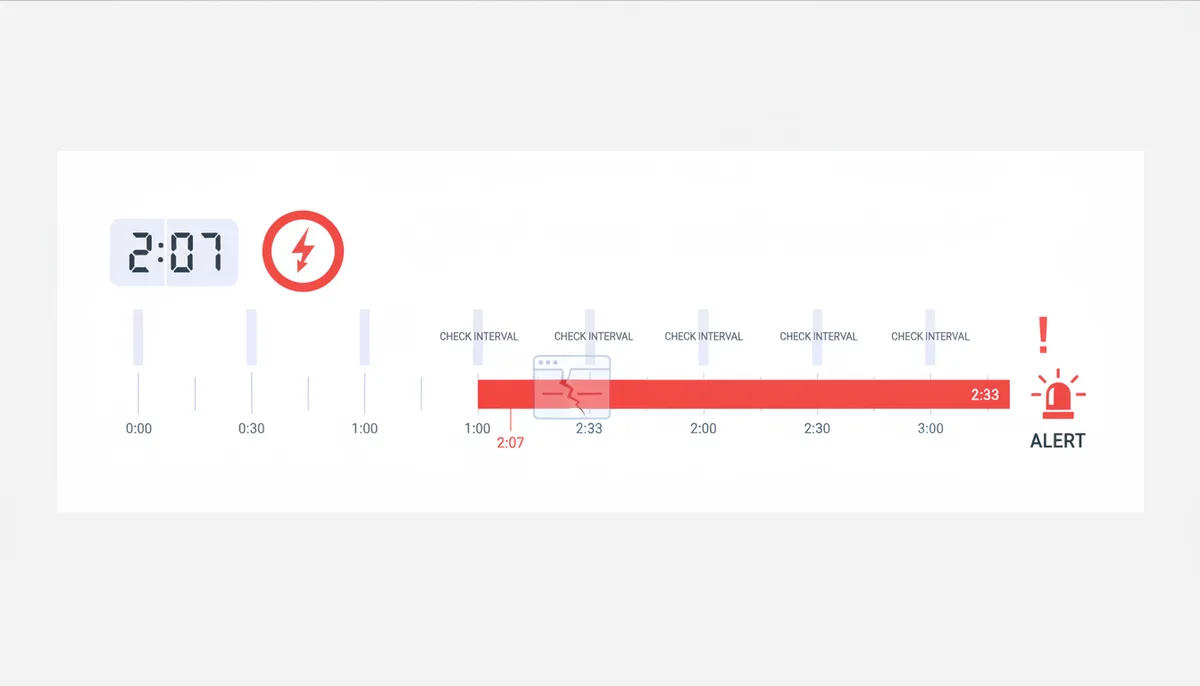
At 2:07 on a Tuesday afternoon, your checkout stops responding. Nobody knows yet. Your uptime checker runs every 30 minutes, so the next probe isn't due until 2:30. It fails, a confirmation check runs, and the alert finally reaches your phone at 2:33 — twenty-six minutes after the first customer hit a dead page. By then, two people have posted about it and one has emailed to ask if you're still in business.
That gap between "the site broke" and "you found out" is controlled almost entirely by one setting: your check interval. Everything else in monitoring — alert channels, status pages, dashboards — matters less than how often you look.
So how often should you check a website for downtime? There's no single correct number, but there is a correct way to work it out: understand what a minute of downtime costs you, understand what each interval buys you in detection speed, and match the two. The rest of this guide walks through exactly that.
Why does choosing the right check frequency even matter?
Every monitoring setup ships with a built-in blind spot, and its size is your check interval. If you probe your site every five minutes, an outage that starts one second after a successful check will go unnoticed for nearly five minutes. On average, you'll be blind for half your interval; in the worst case, a full interval plus whatever time the check itself and any confirmation retries take. This delay has a name: Mean Time to Detection, or MTTD. Your uptime check interval is the single biggest lever you have on it.
Why does that matter? Because the cost of downtime is paid by the minute, in three currencies:
- Revenue. A store doing $15,000 a day averages about $10 per minute around the clock — but sales aren't spread evenly. If 60% of orders land in eight peak hours, a peak minute is worth closer to $19. The 26 undetected minutes from the scenario above cost roughly $500 in lost orders, plus the ad clicks you kept paying for the whole time.
- Reputation. For a B2B service, downtime shows up as support tickets, churn conversations, and SLA credits. Customers may forgive an outage; they rarely forgive being the ones to tell you about it.
- Search visibility. A short outage is usually forgiven by search engines — a failed crawl just gets retried later. Trouble starts when downtime stretches toward days, because pages can begin dropping out of the index. Fast detection is what keeps a two-hour incident from becoming a four-day one.
Now look at the other side of the scale. Monitoring more frequently costs more, but the cost rises in a straight, predictable line: twice the checks, roughly twice the price on a per-check plan. Downtime cost is the opposite — spiky, unbounded, and always arriving at the worst possible time. This asymmetry is why most site owners systematically under-monitor. The bill is visible every month; the risk stays invisible until it isn't.
My position after years of watching this play out: almost everyone should check more often than their gut suggests. The genuinely interesting problem isn't whether to check frequently — it's how to do it without drowning in false alarms. That's a solvable problem, and we'll get to it.
How does an uptime check actually work?
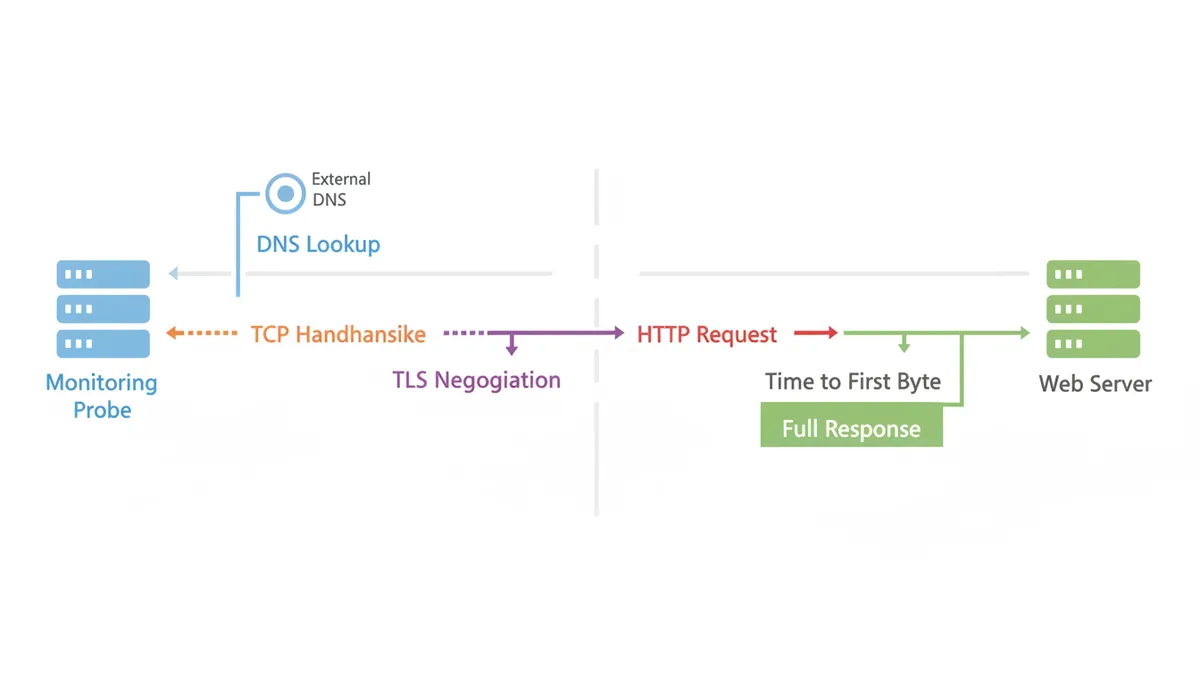
The thing doing the checking is usually called a probe — a server in a data center somewhere that pretends to be a visitor. On a fixed schedule, it sends an HTTP request to your URL and watches what comes back. Strip away the dashboards and that request is a short conversation with several distinct stages, each of which can fail on its own:
- DNS lookup. The probe translates your hostname into an IP address. Failure here means a DNS problem — or an expired domain, which surprises more site owners than you'd expect.
- TCP handshake. It opens a connection to your server. "Connection refused" means the machine or web server process is down, or a firewall is in the way.
- TLS negotiation. For HTTPS, the two sides set up encryption. Failure here usually means a certificate problem — expired, misconfigured, or serving the wrong one.
- HTTP request and TTFB. The probe sends the request and waits. Time to First Byte (TTFB) measures how long your server takes to start answering — it's the clearest signal of how hard your application and database are working.
- Full response. The rest of the page arrives. The probe records total response time and checks the HTTP status code.
What counts as "up"? Typically any 2xx status code, with some setups accepting 3xx redirects. A 503 means your server is alive but overwhelmed; a 500 means your application crashed; a 404 on your homepage means something is badly wrong even though the server is technically responding. Every stage has a timeout — usually somewhere between 5 and 30 seconds — after which a slow site is declared down.
Not all checks are created equal, though. There's a ladder of depth, and where you stand on it determines what kinds of failures you can actually see:
- ICMP ping. The simplest: is the machine alive? Useful for basic server monitoring, but weak as a website check. A server can happily answer pings while the entire web stack on it is dead, and many hosts rate-limit or block ping traffic anyway. Don't rely on ping frequency alone to tell you your site is up.
- TCP port check. Is port 443 accepting connections? This catches a crashed web server, but not a broken application sitting behind a healthy one.
- HTTP status check. The default for website monitoring. Catches application crashes that return error codes.
- Keyword check. The probe fetches the page and verifies that expected text is present — your footer, a product name, anything stable. This catches the nastiest failure mode of all: a page that returns 200 OK while showing an error message, a blank screen, or a maintenance notice. Hand-rolled templates and some maintenance-mode setups do exactly this. A status-only check calls it "up."
- Transaction check. A scripted multi-step flow: log in, add an item to the cart, reach the payment step. The most expensive to run, and the only kind that proves your business logic works, not just your web server.
Here's the baseline I'd recommend to anyone: an HTTP check with a keyword assertion, pointed at a URL that actually exercises your stack — a product page or search results page that hits the database — rather than your homepage. Homepages are aggressive caching targets. Yours can be served perfectly from cache while everything behind it is on fire.
How do I determine my site's ideal monitoring interval?
Forget the idea of a single best interval for website monitoring. The right answer comes from two questions about your specific site.
Question one: what does a minute of downtime cost me? Do the arithmetic. Take your annual online revenue and divide by 525,600 — the minutes in a year. A $2 million-a-year store averages about $3.80 per minute. Then adjust for concentration: if half your revenue arrives in a quarter of your hours, peak minutes run about double the average, so call it $8–15. Now compare intervals. A five-minute interval means up to five minutes of blindness per incident — potentially $40–75 gone at peak before anyone knows. A one-minute interval caps that at $8–15. If you have half a dozen incidents a year, the difference pays for a higher monitoring tier many times over.
Question two: how fast can anyone actually respond? Detection only creates value if someone acts on it. If you're a solo founder who's asleep at 3am, a one-minute alert on a personal blog buys you nothing but interrupted sleep. The same alert on a revenue site buys you the chance to wake up and roll back a bad deploy before the morning traffic arrives. Be honest about your real response capability — your Mean Time to Resolution (MTTR) — because your interval only needs to be fast relative to that.
With those two answers, sites sort themselves into tiers:
| Tier | Example sites | What 10 minutes of downtime costs | Recommended interval | Typical uptime target |
|---|---|---|---|---|
| Critical | E-commerce checkout, SaaS application, payment or API endpoints | Immediate lost sales, abandoned carts, SLA penalties, support surge | 30 seconds – 1 minute | 99.9% – 99.99% |
| Business | Corporate site, lead-generation forms, booking pages | Cooled-off leads, a handful of lost enquiries, some embarrassment | 1 – 5 minutes | 99.9% |
| Content | Blog, news site, documentation, portfolio | Small ad-revenue loss, frustrated readers, minor SEO risk if repeated | 5 – 15 minutes | 99.5% – 99.9% |
| Hobby / staging | Personal projects, test environments | Roughly nothing | 15 – 30 minutes (free tier territory) | No formal target |
Two refinements worth knowing. First, tier by endpoint, not just by site. The same owner can — and should — run a one-minute check on an API health endpoint while the marketing blog on the same domain gets checked every fifteen minutes. Second, the one-minute-versus-five-minute debate matters far less than people think once you add confirmation logic. One minute versus five minutes is the difference between average detection in about 30 seconds and about 2.5 minutes. Whether that two-minute gap is worth paying for depends entirely on your per-minute number from question one. For a blog, it's nothing. For a checkout at peak, it's real money.
What are the risks of choosing the wrong frequency?
Both mistakes are common, and they fail in different ways.
Checking too infrequently hurts in three ways. The obvious one is a long MTTD: with a 30-minute interval and a 25-minute fix time, a single incident can cost you up to 55 minutes of downtime. Six of those in a year is five and a half hours — about two-thirds of the entire annual downtime budget for a "three nines" (99.9%) site, spent on six bad afternoons.
To see why interval choice drives that risk, look at the downtime budget — the total time your site can be down and still honor its SLA. The budget is fixed by the percentage you promise:
| Uptime target | Common name | Downtime per month | Downtime per year |
|---|---|---|---|
| 99.0% | Two nines | ~7 hours 18 minutes | ~3 days 15 hours |
| 99.5% | — | ~3 hours 39 minutes | ~1 day 20 hours |
| 99.9% | Three nines | ~43 minutes | ~8 hours 46 minutes |
| 99.99% | Four nines | ~4 minutes | ~52 minutes |
Your check interval and confirmation rules set your Mean Time to Detection, while your team's speed sets your Mean Time to Resolution. Those two numbers must fit inside the budget together. With confirmation turned on — alerting only after two consecutive failures — average MTTD equals one and a half times your check interval. You wait roughly half an interval for the first probe to hit the outage window, then a full interval for the confirming second check.
Take a site targeting 99.9% with an MTTR of 25 minutes and six incidents per year. Here is how three common intervals consume that budget:
- 15-minute checks: Average MTTD is 22.5 minutes. Each incident costs 47.5 minutes total. Six incidents add up to 285 minutes — over four and a half hours of your roughly eight-hour forty-six-minute annual allowance. One incident alone exceeds the ~43-minute monthly budget.
- 5-minute checks: Average MTTD is 7.5 minutes. Each incident costs 32.5 minutes total. Six incidents add up to 195 minutes. One incident stays inside the monthly budget; two in the same month push you over.
- 1-minute checks: Average MTTD is 1.5 minutes. Each incident costs 26.5 minutes total. Six incidents add up to 159 minutes, leaving comfortable headroom even during a bad month.
The gap between 1-minute and 15-minute detection is not subtle arithmetic. It is the difference between using 30% and 54% of your annual downtime allowance, and between immediately exhausting your monthly budget and keeping a safety margin intact.
The subtler problem is intermittent failure. Plenty of real outages are "flapping" — a site that drops for 60 to 90 seconds whenever a cron job spikes the database, then recovers. A 30-minute check catches these only by luck. Worse, when it does catch one, the isolated failure looks exactly like a false alarm, so it gets dismissed. A one-minute check turns that same pattern into an obvious stripe of red across your dashboard. Shorter intervals don't just detect outages faster; they make whole categories of problems visible at all.
The third cost is social. When your interval is long, your users become your monitoring system. You find out from a support ticket, a social media post, or — the classic — your boss forwarding a screenshot. Every one of those is a small withdrawal from your credibility.
Checking too frequently fails differently, and the failure mode is sneakier. The internet has background noise: a dropped packet, a brief routing change, a two-second garbage-collection pause on your server. Any single check can fail for reasons that mean nothing. If every failed check pages someone, a 30-second interval converts that noise into regular 3am wake-ups.
Then alert fatigue sets in. After enough false alarms, people stop jumping when the phone buzzes. Response time to all alerts climbs, and eventually someone mutes the channel — which is when the real outage arrives. The true cost of over-alerting isn't annoyance. It's the destruction of trust in the alert channel itself, and a distrusted alert channel is worse than a slow one.
Two more practical costs of very high frequency. Load is usually negligible — one check per minute is 1,440 requests a day, less traffic than a single busy minute on a modest site — but twenty endpoints checked every ten seconds with full page loads adds up on a small VPS, and monitoring hits pollute your analytics unless you filter the monitor's user agent. And money: on per-check pricing, one-minute checks on one URL cost 43,200 checks a month; thirty-second checks double that; ten URLs multiply it again. Know how your service bills before you crank the dial.
The escape hatch is confirmation logic. Decent monitoring services let you require two or three consecutive failures before alerting, and most transient blips don't survive a second check a minute later. My default for anything that matters: one-minute checks, alert on two consecutive failures. You get detection inside two to three minutes and discard almost all of the noise. That's how to reduce false positive alerts without giving up detection speed.
How do monitoring locations help avoid false alarms?
The internet isn't one network. It's tens of thousands of networks stitched together by peering agreements, and reachability is not a global yes-or-no. A peering dispute, a regional ISP failure, one sick CDN edge node, or a resolver problem at a single provider can make your site unreachable from an entire continent while it loads instantly everywhere else.
It cuts the other way too. Your own access proves almost nothing: you're one user on one ISP, often geographically close to your host, often looking at a cached page. And there's a classic self-inflicted version — your own firewall or WAF rate-limits the monitoring probe's IP address and starts refusing it. The monitor says down, you say up, and you're both telling the truth from where you stand.
This is why professional monitoring checks from multiple locations. When a probe in one region sees a failure, the service immediately re-checks from others and only alerts if they agree. A single-location failure gets logged as a regional event; agreement across continents gets treated as a real outage. That validation step is what separates a trustworthy alert from a coin flip, and it's the same mechanism that answers the question "is it down for everyone or just me?" — the entire premise behind IsDownAlarm's instant checks, which test a site from an independent vantage point so you can tell your own connection problem from a genuine outage.
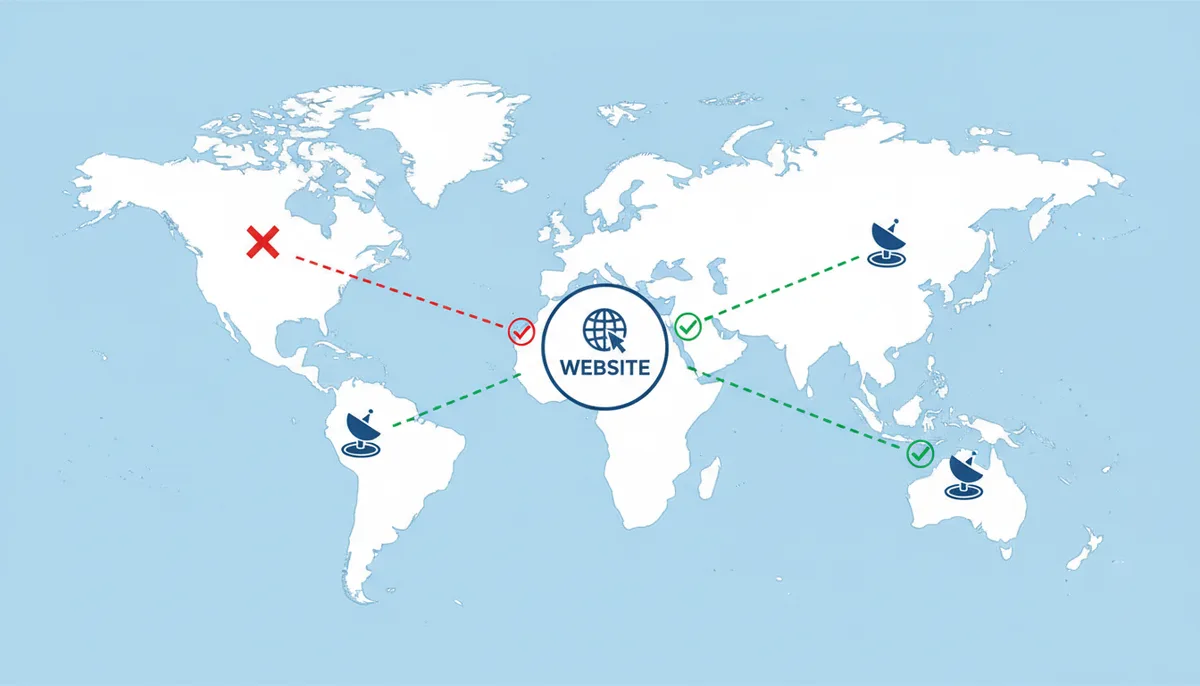
Two edge cases worth knowing about. First, IPv6: if your AAAA record points somewhere broken while your IPv4 record is fine, users on IPv6-preferred networks fail while everyone else sails through — and a probe that only tests IPv4 reports all clear. Second, DNS changes: right after a migration, different resolvers hold different answers for hours, so "down" and "up" can both be correct depending on who asks. Multi-location checking catches the first and explains the second.
There's a bonus beyond correctness. Location data shows you performance by geography: your US-hosted site might respond in 300 milliseconds from Virginia and 2.5 seconds from Sydney. If a chunk of your audience is on the wrong side of that gap, that's a CDN conversation waiting to happen — and you'd never see it from a single probe.
Should I monitor more than just 'up' or 'down'?
A site can pass every uptime check and still be unusable. If your homepage returns 200 OK in fourteen seconds, your monitoring calls it "up" while your visitors call it broken and leave. This state has a name — a brownout — and for an e-commerce site it's downtime in every way that matters except the status code.
The fix is website performance monitoring alongside availability checks. Two metrics do most of the work:
- Response time — the full duration of the request, from the probe's first byte out to the last byte in. This is what users feel.
- TTFB — the share of that time your server spent thinking before it started answering. TTFB and total time together tell you where to look: high TTFB points at your application or database; fine TTFB with a slow total points at heavy pages, bandwidth, or third-party scripts.
These metrics only help if you turn them into rules that match their urgency. A failed HTTP check is binary: the site is either serving errors or it is not. A slow check is a gradient, and one slow response usually proves nothing. Treat them differently.
Alert on response time, not just downtime. Set a threshold based on user pain, not a round number. For most consumer checkout flows, sustained load times over three seconds measurably increase abandonment. For an API that feeds a mobile app, 500 milliseconds may already be too long because it determines whether the screen feels instant or broken. Pick a number you can defend with either business data or a downstream timeout.
Demand more confirmation for slowness than for failure. Where I page on two consecutive HTTP errors, I usually require three or four consecutive slow readings before a performance warning fires. Most transient slowdowns — a backup job, a traffic spike, a brief garbage-collection pause — resolve in under two minutes. A warning that waits one extra interval strips out that noise without missing a genuine capacity problem.
Match check weight to check frequency. Lightweight HTTP checks that just fetch a header or a small page are cheap enough to run every minute from multiple locations. Heavier transaction checks — logging in, adding to cart, reaching the payment step — cost more in probe time and in load on your server. Run those every five or ten minutes, or from fewer locations, and treat them as a second layer beneath your faster uptime checks.
Here is how that looks for an e-commerce checkout page:
- Uptime: Every 60 seconds from three global locations. Page the on-call engineer after two consecutive 5xx status codes.
- Performance: Every 60 seconds from the same locations. Send a warning — dashboard and chat, not pager — only after three consecutive responses exceed 3,000 milliseconds.
- Transaction: A scripted purchase flow every 5 minutes with a 15-second timeout. Alert on two consecutive failures, treating a broken checkout with the same urgency as a total outage.
The split is deliberate. Hard failures escalate fast because they are unambiguous. Slow responses escalate slowly because a single slow probe is noise, but three in a row means your server is consistently struggling. Transaction checks run less frequently because they are expensive, but they catch the failures that a simple status check cannot — like a payment gateway returning 200 OK with an empty body. Together they give you speed where it is cheap and depth where it matters, without flattening every signal into the same loud alarm.
Sources
- Amazon Web Services — The principles of the Reliability Pillar, which advocate for designing systems to detect failures and automatically recover, backing the overall importance of proactive monitoring.
- MDN Web Docs — Authoritative definitions for HTTP status codes (e.g., 200 OK, 503 Service Unavailable), which are the primary indicators an uptime check uses to determine a site's status.
- Uptime.is — A simple, authoritative calculator for converting uptime percentages (like 99.9%) into concrete units of downtime (days, hours, minutes), used in the "How do I determine my site's ideal monitoring interval?" section where uptime targets are discussed.