IsDownAlarm vs UptimeRobot: Which Website Monitoring Tool Fits Your Use Case
Your checkout page turns red. Your boss walks past your desk and asks about the sudden drop in sales. You tab back to your browser, paste the URL, and watch Chrome spin for four ag
Your checkout page turns red. Your boss walks past your desk and asks about the sudden drop in sales. You tab back to your browser, paste the URL, and watch Chrome spin for four agonizing seconds before the page loads. You exhale. The site is fine. But then you realize your marketing partner hasn't received the automated campaign email she just triggered. Was it your hosting, the email gateway, or a temporary route failure? You just wasted twenty minutes acting as your own on-call engineer for a problem that should have sent you a notification before you even finished your coffee.
This is the difference between checking a website manually and monitoring it. You have two paths to avoid this kind of firefight. On one side, you have tools built for instant, on-demand diagnostics—like IsDownAlarm—which let you verify the health of any public resource in seconds without creating an account. On the other side, you have legacy monitoring platforms like UptimeRobot, designed to stand guard 24/7 and wake you up the moment something breaks.
The debate isn't really about which tool is better; it's about which problem you are solving right now. Are you trying to answer a question someone just asked you? Or do you need to ensure nobody has to ask that question anymore? Most teams pick the wrong starting point because they chase features instead of workflow. I've seen developers spend hours configuring alert rules on a monitoring dashboard for a single page that crashes once a year, while neglecting the fundamental check that would have caught the incident immediately.
We will compare IsDownAlarm and UptimeRobot not as a checklist, but as distinct approaches to availability. We'll look at where IsDownAlarm's hybrid model beats manual checks, where UptimeRobot's veteran infrastructure pays off, and how to decide between them based on your stack, your tolerance for false alarms, and your budget.
When Do You Need an Instant Check vs. Proactive Monitoring?
Before you sign up for anything, define the gap you are trying to close. There are two fundamentally different scenarios here, and confusing them leads to either frustration or overspending.
The "Just Me?" Problem
You are on the road. Your mobile data acts up. A critical vendor portal won't load. You wonder: is the vendor down, or is my ISP routing garbage? You need an answer in thirty seconds. You don't care about uptime percentages over the last quarter. You just need a second opinion from a neutral observer who isn't behind your firewall. This is an instantaneous check. You solve this by using a public status checker.
The "Wake Up Call" Problem
You host your own e-commerce store or SaaS application. You know that when it goes down, revenue bleeds immediately. You cannot be checking manually every ten minutes. You need a system that verifies your site continuously from multiple global points and interrupts your day only when there is a genuine outage. You accept the cognitive overhead of managing monitors so you can stop monitoring. This is proactive monitoring.
IsDownAlarm dominates the first scenario. Its core value is that you can check the status of amazon.com, your internal staging site (if exposed), or your client's landing page instantly. You type a URL, hit enter, and see the result. No signup. No configuration. It effectively outsources your local connectivity anxiety to their servers.
UptimeRobot exists solely for the second scenario. It has no "instant check" widget for public browsing. It assumes you already know which endpoints require vigilance. You pay for the privilege of someone else watching the gauges while you sleep.
If you only need to verify external sites occasionally, paying for UptimeRobot makes no sense. Conversely, relying on IsDownAlarm's free checker for your production site leaves you blind to outages between your manual checks. You need both philosophies if you run critical infrastructure, but we must evaluate how each platform delivers its respective strengths.
What Is IsDownAlarm? The Hybrid Checker and Monitor
IsDownAlarm positions itself as a bridge. It begins as the lightning-fast, no-login-required diagnostic tool you see in the header of its homepage. This is its acquisition engine and its primary utility for the general public. You walk in, check if Google is down, leave happy. The interface strips away complexity. You get real-time responses, clear status indicators, and transparency on response times.
However, IsDownAlarm recognizes that users who start with an instant check often graduate to needing protection. This is where the "Monitoring" part of the business kicks in. Once you create an account and subscribe to a premium tier, the tool transforms into a continuous watcher. You add your own domains, select alert channels, and let the platform poll your site.
The trade-off here is design philosophy. IsDownAlarm prioritizes accessibility and speed. The monitoring features are built on top of a foundation optimized for quick verification. This means the user experience for adding a monitor is streamlined, often requiring fewer clicks than a dedicated enterprise tool. You are not wrestling with JSON templates or complex API keys unless you need deep customization.
IsDownAlarm targets three distinct groups:
- Casual users and managers who need to verify vendor uptime or troubleshoot connectivity issues on the fly.
- Solo developers and freelancers building a portfolio of client sites who want simple, reliable uptime alerts without learning a full monitoring suite.
- Small businesses that rely on their web presence for transactions but lack the DevOps team to build custom alerting pipelines.
A key strength to note is the alerting integration. IsDownAlarm explicitly emphasizes instant notifications via Email, SMS, and Telegram. This signals a focus on reach. You aren't just getting logged errors; you are pushing interruptions to the devices where you are most likely to act. Telegram support, in particular, appeals to modern development workflows where command-line operations and chat-based ops are common.
While IsDownAlarm handles the monitoring job well, you must understand it is optimizing for the web layer. The platform shines when you need to know if a URL returns a 200 OK or a timeout. If your architecture relies heavily on TCP ports, UDP streams, or background cron jobs outside of HTTP, IsDownAlarm's value proposition narrows significantly. For the web-facing business, however, it cuts straight to the signal.
What Is UptimeRobot? The Dedicated Monitoring Veteran
UptimeRobot is not a hybrid. It is a specialized instrument. Founded over a decade ago, it has accumulated millions of monitored endpoints, making it one of the most recognized names in uptime tracking. This longevity translates into trust and infrastructure maturity. When you sign up for UptimeRobot, you are stepping into a dashboard-centric ecosystem designed entirely for vigilance.
The platform assumes you are technical or working with a technical team. The default view is a list of monitors, statuses, and response times. There is no "browse and check public sites" mode that distracts from the core mission: preventing downtime. Every click on UptimeRobot is geared toward adding a new monitor, tweaking an alert contact, or adjusting a maintenance window.
UptimeRobot's authority comes from its breadth. It does not just ping HTTP URLs. It provides monitoring types that reflect the complexity of modern infrastructure:
- Ping (ICMP): Monitors servers regardless of HTTP status, essential for game servers, IoT gateways, and network devices.
- Port Monitoring: Checks specific TCP/UDP ports, useful for database services or custom applications running behind web proxies.
- Keyword Monitoring: Polls a URL and fails only if a specific string appears or disappears, catching logical errors that return HTTP 200.
- Cron Job Monitoring: Generates a unique URL you call from your scheduled tasks. If the call never happens, you get alerted. This detects broken scripts, not just broken websites.
- DNS Monitoring: Watches for zone changes and propagation delays.
This versatility defines UptimeRobot's audience: DevOps engineers, managed service providers, and agencies managing dozens of diverse client stacks. You choose UptimeRobot when your definition of "downtime" extends beyond the browser.
There is a cost to this density. The interface can feel dense to a non-technical founder. You have to navigate settings to configure "Steps Before Alert," set up HTTP headers for private sites, or map out webhooks. IsDownAlarm simplifies this trade-off. You lose some granularity and protocol options, but you gain a cleaner path to a functioning alert.
Head-to-Head: What Kinds of Checks Can You Run?
The capability matrix dictates what you can protect. If your site is purely a static HTML page, both tools work. If you are running a distributed system with headless commerce APIs, background processors, and database ports, the gap widens. Here is where you match your stack to the tool.
HTTP(S) Monitoring
Both platforms excel here. UptimeRobot offers granular control: GET or POST requests, authentication via headers, and expected status codes. This allows you to simulate a user login or test an API endpoint. IsDownAlarm supports HTTPS checks and monitors response time trends, ensuring your secure connections are valid. For standard web traffic, the difference is marginal; both will tell you if the server responds.
Ping and Port Checks
UptimeRobot includes Ping and Port monitoring across its tiers. This is critical for backend health. A server might be rejecting HTTP requests due to a web server crash while still answering Ping packets. UptimeRobot lets you distinguish this from total server death. IsDownAlarm focuses primarily on the web request layer. While "website monitoring" implies HTTP checks, IsDownAlarm does not prominently advertise dedicated TCP/UDP port monitoring or raw ICMP ping checks in its core feature set. If you need to monitor a Redis instance or a game server, UptimeRobot is the functional choice.
Keyword and Logic Checks
UptimeRobot allows you to search for a keyword in the page source. If your homepage loads but misses the "Shop Now" button, the keyword check fires. IsDownAlarm's instant checker reads the visual status and response time, but its monitoring layer appears focused on availability rather than content integrity. For apps where the UI renders incorrectly but returns HTTP 200, UptimeRobot prevents the silent failure.
Cron Job Monitoring
This is UptimeRobot's killer feature for operational reliability. Many sites go "down" not because the server crashed, but because the payment webhook failed or the backup script hung silently. UptimeRobot generates a cron-specific endpoint. When your task hits that URL, the monitor resets. If the task skips, the monitor triggers a down alert. IsDownAlarm does not appear to offer cron job monitoring based on its current scope. This gap forces users of IsDownAlarm to build their own heartbeat logic.
| Feature | IsDownAlarm (Free/Paid) | UptimeRobot (Free/Paid) |
|---|---|---|
| HTTP(S) Check | Yes. Standard HTTPS polling with response time logging. Available on premium monitoring plans. | Yes. Supports GET/POST, header auth, custom body, and expected status codes. Available on all plans. |
| Ping Check (ICMP) | No / Not advertised. Focuses on web-layer verification. | Yes. Monitors server availability via ICMP Echo. Available on paid tiers and above. |
| Port Check | No. Limited to standard web services. | Yes. Monitors specific TCP/UDP ports. Essential for databases and app servers. |
| Keyword Check | No. Monitors status and latency, not page content. | Yes. Scans page content for specific strings to catch logical errors hidden behind HTTP 200. |
| SSL Certificate Monitoring | Yes. Tracks expiration dates to prevent TLS handshake failures. | Yes. Alerts on approaching expiration; integrated into HTTP monitors. |
| Cron Job Monitoring | No. No mechanism for task heartbeat verification. | Yes. Unique URLs for cron tasks detect missed runs and script failures. |
The takeaway is mechanical. If your risk is "the site won't load," IsDownAlarm covers you. If your risk is "the site loads, but the checkout process is broken because the database port is closed," you need UptimeRobot's protocol variety.
Alerting Systems: How Will You Know When There's a Problem?
A monitor that fails to alert is expensive hardware paperweight. The quality of your alert system determines whether an outage kills your business or becomes a minor log entry. Let's look at how these platforms interrupt you.
Channels and Reach
IsDownAlarm promotes Email, SMS, and Telegram as its primary alert vectors. This is a pragmatic triad. Email reaches everyone. Telegram catches developers who live in chat apps. SMS bypasses data blockers but often incurs carrier fees. IsDownAlarm bundles these to lower the barrier to entry. You do not need to negotiate third-party bots or webhook payloads to get started on Telegram; you enable it and input your chat ID.
UptimeRobot offers a wider menu: Email, SMS, Slack, Discord, PagerDuty, Opsgenie, VictorOps, Webhook, Phone Call, and Push Notification. If you are running a professional incident response chain, UptimeRobot integrates directly with PagerDuty. You can escalate severity automatically. IsDownAlarm lacks this enterprise orchestration. You have to forward the IsDownAlarm alerts to Slack manually or build a bridge. For individuals and small teams, IsDownAlarm's direct channel list is sufficient. For agencies managing client SLAs, UptimeRobot's native integrations save engineering hours.
Configurability and Noise Reduction
The enemy of good monitoring is alert fatigue. If you get a phone call every time your WiFi drops for ten seconds, you will mute the tool. Both platforms mitigate this with "Steps Before Alert" logic. UptimeRobot calls this "Steps Before Alert," letting you define how many consecutive checks must fail before the status turns red. IsDownAlarm uses similar logic to filter transient blips.
UptimeRobot takes this further with Maintenance Windows. You can block alerts during a scheduled deployment or patch window. You specify the start time, end time, and recurring pattern. IsDownAlarm's interface is simpler; it likely relies on pausing monitors or waiting for stabilization after a check. If you deploy weekly and hate waking up at 2 AM for planned maintenance, UptimeRobot's maintenance windows are a hard requirement. Without them, you waste cycles confirming known upgrades.
Cost of SMS and Advanced Contacts
SMS costs money. UptimeRobot's free tier restricts SMS, pushing you toward email or third-party webhooks for unlimited alerts. Paid plans unlock SMS credits or allowances. IsDownAlarm also structures SMS within its premium offerings. The rule here is practical: treat SMS as a high-priority escalation channel, not your first line. Rely on Email and Telegram for initial warnings; reserve SMS for incidents lasting longer than five minutes. Both platforms make this hierarchy manageable, but UptimeRobot's finer control over which contacts receive which alerts adds precision for large teams.
Ease of Use: From First Visit to First Alert
Friction kills adoption. If setting up monitoring feels like tax preparation, you will skip it. We need to contrast the user journeys, because they serve different mental models.
The IsDownAlarm Flow
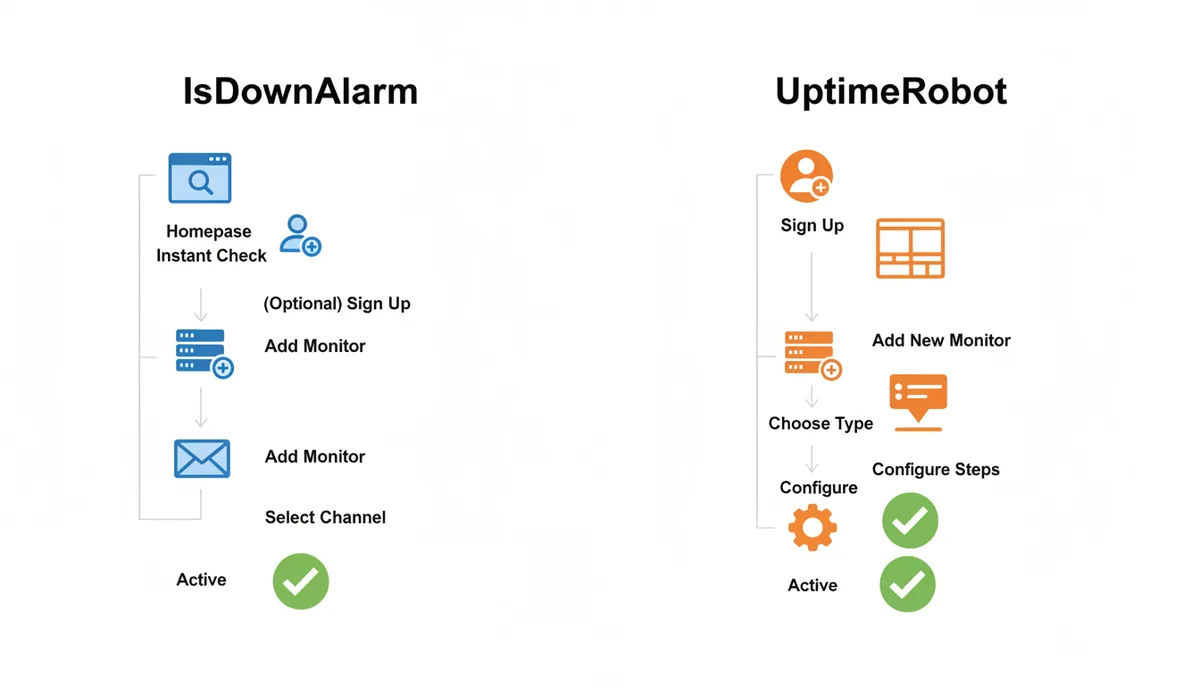
For the instant check, friction is zero. You visit the homepage, type a URL, get a result. This builds habit and trust. To transition to monitoring, the leap is moderate. You sign up, land on a clean dashboard, and click "Add New Monitor." You provide the URL, select the region or check type (likely defaulted to HTTP), and toggle on Telegram or Email. The prompts are short. The terminology is plain English. IsDownAlarm removes the temptation to over-engineer. You can be monitoring your first client's site in under two minutes.
The UptimeRobot Flow
UptimeRobot demands commitment upfront. You register, enter the dashboard, and face a grid of existing monitors. You click "Add New Monitor." Immediately you are prompted with options: Name, Type, URL, Steps, Alert Contacts. The dropdown for "Type" exposes Ping, Port, Keyword, and more. You might find yourself reading documentation to set up HTTP headers for authentication. The interface rewards familiarity. Once you know the drill, adding a monitor is fast. The learning curve is steeper. A founder without technical context might pause at the distinction between a Ping check and an HTTP check. IsDownAlarm avoids this confusion by focusing on the web request first.
Persona Fit
Non-technical stakeholders, agency owners onboarding junior staff, and solo developers who value speed over configuration will prefer IsDownAlarm. They want the alert, not the admin panel. Developers comfortable with sysadmin concepts, those managing heterogeneous stacks, and teams with established incident runbooks will find UptimeRobot's slight friction worth the payoff in control. You trade setup time for configurability. If you spend an hour configuring UptimeRobot correctly, you save months of debugging false positives. If you just need to know if the marketing page is up, IsDownAlarm is faster.
Advanced Features: Status Pages, APIs, and Integrations
Once monitoring is stable, you often need to report on it. External stakeholders, customers, and partners want proof of reliability. This moves us into status pages, APIs, and ecosystem hooks.
Public Status Pages
UptimeRobot offers customizable public status pages. You can clone a template, add your logo, map components (e.g., API, Frontend, Database), and publish a URL. This is vital for SaaS companies. Customers checking your status page should see historical uptime graphs and incident timelines without contacting support. IsDownAlarm provides "Recent Checks" and "Popular Websites Status" on its own domain, demonstrating transparency in its own operations. However, its profile does not highlight robust, white-label status page generation for user-owned sites. If you need to host a status page at status.yourcompany.com with custom branding and component grouping, UptimeRobot is the functional leader. IsDownAlarm may offer basic status visibility, but UptimeRobot treats this as a core product feature.
API Access
Both platforms expose APIs. IsDownAlarm lists "API Docs" in its navigation, indicating developer accessibility. You can programmatically fetch monitor status, trigger checks, or retrieve response times. UptimeRobot also provides a comprehensive REST API. The difference lies in depth. UptimeRobot allows API-driven management of monitors, alerts, and schedules, enabling you to automate infrastructure provisioning. IsDownAlarm's API likely supports core read/write operations for monitoring. For teams integrating monitoring into CI/CD pipelines or custom dashboards, UptimeRobot's API offers richer interaction points. IsDownAlarm suffices for retrieving alerts or simple syncs.
Integration Ecosystem
UptimeRobot connects natively to Slack, Discord, PagerDuty, and Webhooks. It also integrates with Zapier, allowing you to bridge monitors to virtually any service that accepts webhook events. This openness is a safety net. You can route alerts to Jira, Confluence, or custom functions. IsDownAlarm focuses on direct integrations with Email, SMS, and Telegram. This is a deliberate narrowing. By supporting Telegram deeply, IsDownAlarm captures a segment of the developer market that prefers chat apps over Slack bot configurations. However, if your toolchain relies on a specific webhook consumer or a niche integration provider, UptimeRobot's web-first approach gives you leverage. You can wire up almost anything to a webhook.
The advanced feature gap favors UptimeRobot for organizations treating uptime as a service-level agreement (SLA) documentable asset. IsDownAlarm treats uptime as a binary signal to keep you informed.
Reporting and Analytics: Making Sense of Your Downtime
Alerts fix the present. Reports fix the future. You need to analyze response time trends, identify degradation before failure, and calculate uptime percentages accurately.
Data Visualization
Both tools track Response Time (RT) and Uptime Percentage. IsDownAlarm presents this data through clean graphs, showing latency spikes alongside status changes. This correlation is valuable. You can spot a trend where RT increases week-over-week, signaling capacity issues before the server drops. UptimeRobot offers similar charts but breaks data down by monitor type and location. With multiple monitoring locations (standard on higher tiers), you can see if latency issues are regional. This helps isolate CDN problems from origin server bottlenecks.
Data Retention
How far back can you look? UptimeRobot's free plan retains historical data for seven days, which is tight. Paid plans extend this to years of data. This retention is crucial for post-mortems. You need to prove to a stakeholder that a Friday night outage was isolated, not systemic. IsDownAlarm's retention policy depends on its plan levels. As a premium tool, it should retain sufficient history for trend analysis, though you must verify specific tier limits during selection. If your compliance requirements demand twelve months of audit logs, you likely need to target the paid tiers of both services and confirm storage duration.
Incident Logs
When an alert fires, you want a snapshot. UptimeRobot logs the exact HTTP response code, headers, and timing for the failing checks. This granularity speeds up triage. You can see if the error was a 502 Bad Gateway (proxy issue) or a timeout (database lock). IsDownAlarm provides response time logs and status transitions. For most web outages, knowing the RT spike and status change is enough to dispatch the right engineer. However, if you suspect subtle payload corruption or header manipulation attacks, UptimeRobot's deeper logging wins. The choice hinges on your diagnosis depth.
Pricing and Value: A Detailed Breakdown of Free and Paid Tiers
Money clarifies intent. Free tiers reveal what each company thinks is viable for the masses. Paid tiers reveal where the value lies.
The Free Tier Trap
UptimeRobot's free plan is famously generous regarding monitor count: up to 50 monitors. This attracts startups and hobbyists. However, it restricts you to HTTP checks and a 5-minute interval. You cannot use Ping, Port, or Keyword checks, and you get no SMS alerts. It is a functional baseline for a single web project.
IsDownAlarm's free tier operates differently. It is primarily an instant check tool. For monitoring, the free tier may be limited or non-existent depending on current promotions, forcing users to upgrade quickly to maintain active watchers. Or, it offers a very restricted number of monitors at a slower interval. The philosophy here suggests IsDownAlarm monetizes the continuous guard duty aggressively. You use the free tool for discovery; you pay for peace of mind.
Cost-Benefit Analysis
Imagine you have $10 a month to allocate to monitoring. At UptimeRobot, you get Pro Plus or Pro Monster plans, unlocking hundreds of monitors, sub-minute intervals, ping/port checks, and SMS credits. You maximize scope. If you manage fifty WordPress sites, UptimeRobot is mathematically unbeatable on price-per-monitor.
At IsDownAlarm, $10 buys you Pro features tailored to performance and specific alerts. You might get fewer total monitors, but with faster intervals, better Telegram handling, and potentially more robust HTTP monitoring logic. If you only monitor five critical applications, IsDownAlarm's Pro plan delivers higher fidelity alerts for those five than UptimeRobot's cheapest tier could for fifty mediocre ones. You pay for precision versus quantity.
| Attribute | IsDownAlarm (Free) | IsDownAlarm (Pro) | UptimeRobot (Free) | UptimeRobot (Pro) |
|---|---|---|---|---|
| Primary Cost | $0 | Premium subscription (varies by plan) | $0 | Starts around $7/month |
| Monitors Allowed | Unlimited instant checks (no active monitoring) | High quota; scales with plan | Up to 50 monitors | Hundreds to thousands of monitors |
| Check Interval | N/A (on-demand) | Fast intervals (e.g., 1 min) | Every 5 minutes | Faster intervals (1 min, 30 sec, 10 sec) |
| Monitoring Types | Instant web check only | HTTP/HTTPS and detailed checks | HTTP/HTTPS only | HTTP, Ping, Port, Keyword, Cron, DNS |
| SMS Alerts | Not available on free | Included or credit-based | Limited or excluded | Included with credits/allowances |
| Status Pages | Basic recent checks visible | Enhanced visibility and analytics | Custom status pages included | Full custom pages with branding |
| Data Retention | Immediate results only | Extended history | 7 days | Years (depending on tier) |
The strategy is clear. If your bottleneck is volume, UptimeRobot scales horizontally. If your bottleneck is signal quality and rapid resolution for critical assets, IsDownAlarm compresses the feedback loop. Evaluate your "danger zone": do you have one site that costs $1,000 per minute of downtime, or fifty sites that cost $1 per minute? Assign the heavy artillery accordingly.
Accuracy: How Do They Avoid False Positives?
A false positive is worse than silence. Waking you up at 3 AM for a transient packet loss erodes trust. When you finally ignore the alarm, it hits for real, and the damage is done. Both platforms battle false positives through redundancy and validation logic.
Multi-Location Verification
Neither IsDownAlarm nor UptimeRobot checks your site from a single server. A single data center can suffer routing blackholes, BGP leaks, or local cache storms. Both services distribute checks across multiple geographic regions. An alert only triggers when a consensus of locations agrees your site is down. IsDownAlarm leverages its network of observers to validate status globally. UptimeRobot does the same, maintaining a vast fleet of probes. This eliminates the "my ISP is broken" false alarm that plagues single-ping tools.
Consecutive Failure Thresholds
Even with multi-location checks, networks jitter. Tools implement step thresholds. If a site fails one check but recovers on the second, it marks a blip, not an outage. UptimeRobot allows you to configure this rigorously: "Alert only if 3 consecutive steps fail." IsDownAlarm applies similar smoothing mechanics to ensure alerts represent sustained issues. The trade-off is latency; stricter thresholds delay the alert but guarantee accuracy. For production systems, accepting a two-minute delay to reduce noise is wise.
HTTP vs. Lower-Level Conflicts
Sometimes the server is alive, but the web root is misconfigured. IsDownAlarm's focus on HTTP means it validates the application layer. You see the outage exactly as a customer does. UptimeRobot's Ping checks might show the server is responsive while the web app hangs. This can create apparent contradictions. The best practice is pairing HTTP monitors with Ping monitors on UptimeRobot to triangulate the fault. IsDownAlarm relies on HTTP success/failure as the ground truth. This is generally sufficient for web properties, reducing the cognitive load of cross-referencing protocols.
Ultimately, accuracy depends on your configuration. Over-monitoring without deduplication leads to noise. Under-monitoring hides faults. Both tools provide the mechanisms to tune sensitivity; your discipline in setting thresholds determines the final reliability.
Final Verdict: Which Monitoring Tool Fits Your Use Case?
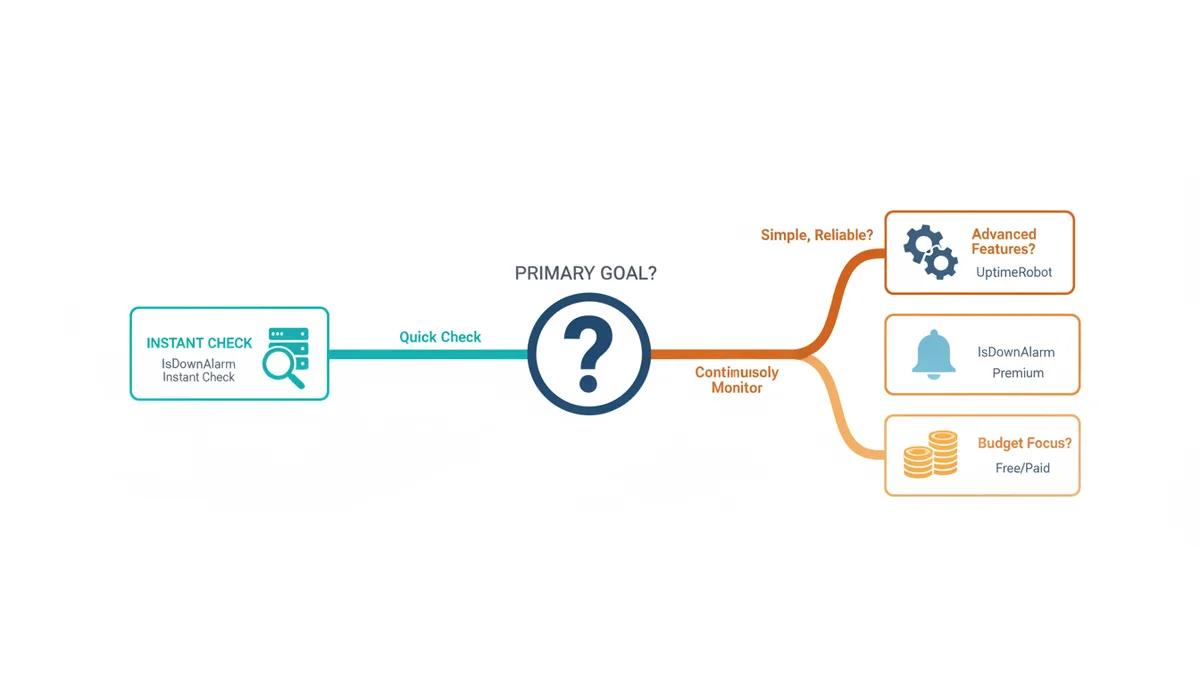
We have dissected the mechanics, the alerts, the pricing, and the philosophy. Now, let's cut to the recommendation. Use the personas below to place yourself.
Choose IsDownAlarm if:
- You need instant clarity. You frequently query the status of vendors, partners, or public resources and want a fast answer without logging in.
- You manage a small number of critical sites. You have three or five applications that generate revenue. You want precise, high-frequency monitoring and clean Telegram/Email alerts, not a sprawling dashboard.
- You value setup speed. You want to start receiving downtime notifications within minutes of signing up, with minimal configuration friction.
- You prefer chat-native ops. Telegram is your hub. IsDownAlarm's direct support reduces integration overhead.
Choose UptimeRobot if:
- You run a complex infrastructure. You need to monitor databases, game servers, API endpoints, and background cron jobs alongside your web frontend.
- You are an agency or SaaS provider. You manage dozens or hundreds of clients. UptimeRobot's volume pricing and scalability make the economics work better than premium-only tools.
- You require SLA documentation. You need white-label status pages to publish uptime guarantees to your customers professionally.
- You integrate with enterprise tooling. You use PagerDuty, Opsgenie, or extensive webhook automation. UptimeRobot's native ecosystem fits deeper.
The Pragmatic Compromise
Many successful operators use both. You install IsDownAlarm for your "public eye" and instant diagnostics. You check vendors there. You deploy UptimeRobot for your internal "eyes open," guarding the critical stack with ping, cron, and port checks. This dual-stack approach solves every category of outage but adds administrative weight. For most teams, picking the tool that matches the majority of their failure modes is the smarter allocation of resources. Match the instrument to the pain. Don't hire a scalpel to hammer nails.
FAQ
Can I use both IsDownAlarm and UptimeRobot together?
Yes. Many teams adopt a dual strategy. You can use IsDownAlarm for instant, no-login checks on any website to troubleshoot connectivity or verify vendors on the fly. Simultaneously, you can run UptimeRobot as your dedicated, continuous watchdog for your own critical servers, taking advantage of its broader protocol support and integrations. This covers both reactive diagnostics and proactive prevention.
Do these tools monitor for security issues like malware or hacking?
No. Both IsDownAlarm and UptimeRobot are availability and performance monitoring tools. They verify that your servers respond and return expected data. They do not scan for malware, SQL injection vulnerabilities, or unauthorized access attempts. Security monitoring requires dedicated solutions like vulnerability scanners or file integrity monitors. A site can be fully up and secure, or fully up and compromised; uptime monitoring cannot distinguish between the two.
What is the most common cause of a 'false positive' alert?
Temporary network routing issues between the monitoring service's probe and your origin server are the most frequent culprit. Transient packet loss, DNS propagation lag, or ISP congestion can cause a single check to fail. Reputable tools mitigate this by using multiple locations and requiring consecutive failures before alerting. If you receive a false positive, check the timeline: a brief spike followed by recovery confirms a routing blip rather than a real outage.
How does the 'check frequency' or 'interval' affect monitoring?
Frequency controls detection speed. A 1-minute interval means you detect downtime sooner than a 5-minute interval, reducing the window of user impact. However, shorter intervals increase server load slightly (negligible for both tools) and are often reserved for paid tiers. Longer intervals are sufficient for low-risk sites like marketing blogs, while e-commerce checkout flows should utilize the fastest intervals available to minimize lost revenue.
Can these tools monitor services on my internal network or behind a firewall?
Generally, no. As cloud-based services, both platforms operate from public internet servers. They cannot reach IP addresses or hosts hidden behind NAT, firewalls, or VPNs that block incoming requests from untrusted sources. To monitor internal assets, you would need to expose them publicly or deploy a local agent/proxy that bridges the internal service to the monitoring service. Neither IsDownAlarm nor UptimeRobot provides native internal-network agents as a primary feature.
Will running these monitoring checks slow down my website?
No. The requests made by monitoring tools are lightweight HTTP pings or simple TCP connections occurring infrequently (every 1 to 5 minutes). The load generated is equivalent to a handful of human visitors per day. Modern web servers handle this traffic without CPU or memory strain. You do not need to throttle monitoring intervals to protect performance; the overhead is functionally zero compared to normal user traffic.
Sources
- MDN Web Docs (Mozilla) — Definitions and explanations of HTTP status codes (e.g., 200, 404, 503) that are fundamental to how uptime monitoring works.
- Cloudflare Learning Center — Authoritative explanations of core internet concepts like DNS, SSL/TLS certificates, and Ping (ICMP), which are often monitored by these tools.
- Internet Engineering Task Force (IETF) — The ultimate standards body for internet protocols, cited here for protocol specifications such as ICMP (used by Ping).
- UptimeRobot — Source for UptimeRobot's published feature set, plan limits, and pricing information.